
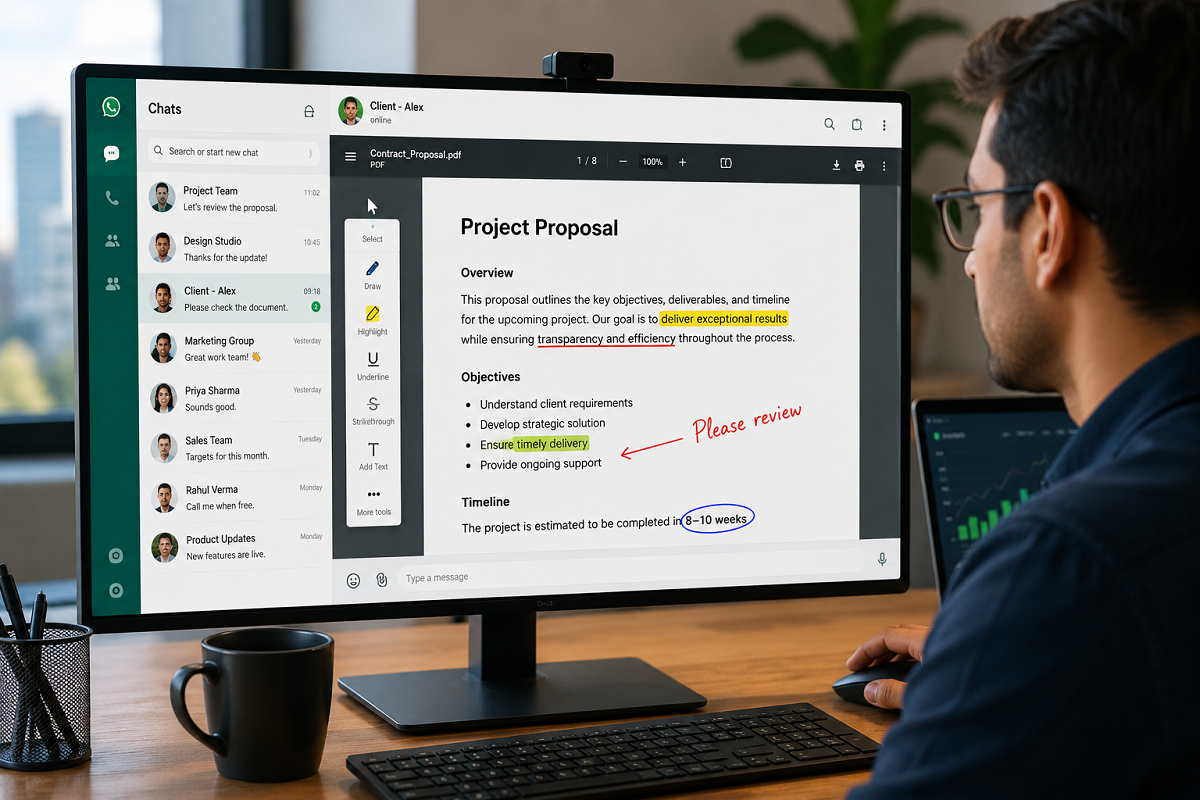
WhatsApp has introduced a major productivity upgrade by integrating Adobe Acrobat into its platform, allowing users to open and perform basic edits on PDF files directly within chats. The new feature eliminates the need to download documents or switch to another application before viewing them, making document sharing and collaboration much more convenient.
The update has been rolled out globally for WhatsApp Web and the Windows desktop application, giving users a smoother way to handle PDF documents without leaving the chat window.
WhatsApp Makes PDF Handling Easier Than Ever
For years, opening a PDF received on WhatsApp required users to download the file and launch a separate PDF reader. With the latest update, that extra step is no longer necessary.
Users can now click on a PDF attachment inside a WhatsApp conversation and instantly view it within the application. The integrated viewer also supports smooth scrolling, zoom controls, and full-screen mode, making it easier to read lengthy documents on larger screens.
This improvement is designed to streamline document workflows, especially for users who frequently exchange contracts, reports, invoices, manuals, and other business-related files.
Adobe Acrobat Powers the New Experience
The new functionality is made possible through WhatsApp's integration with Adobe Acrobat, one of the world's most widely used PDF management platforms.
Besides simply viewing documents, users can also perform several lightweight editing and annotation tasks without downloading the file first. Available tools include:
- Highlight important text
- Underline selected content
- Add strikethrough formatting
- Draw or annotate on documents
- Open the file in Adobe Acrobat for advanced editing
These options allow users to quickly review and mark documents before sharing feedback or making further changes.
No Need to Download PDF Files
One of the biggest advantages of the new integration is that PDF documents can be accessed directly from the chat interface.
Instead of saving files locally, users can preview documents immediately after receiving them. This reduces unnecessary downloads, saves storage space, and speeds up document access.
For professionals who regularly exchange files throughout the day, the update offers a faster and more efficient workflow.
Helpful for Businesses and Professionals
WhatsApp says the feature will be especially useful for businesses that rely on document sharing with customers and clients.
Using WhatsApp Web on a desktop or laptop allows users to review PDF files on a larger display, making contracts, quotations, invoices, presentations, and reports easier to read.
Customer support teams, freelancers, consultants, and small business owners may benefit from being able to examine documents and make quick annotations without interrupting ongoing conversations.
The feature also supports a more seamless collaboration process by keeping communication and document review within the same interface.
Security Remains a Priority
WhatsApp has emphasized that the new document experience does not compromise user privacy.
According to the company, PDF files continue to benefit from WhatsApp's end-to-end encryption, ensuring that shared documents remain protected during transmission.
In addition, password-protected Acrobat documents retain their security features, providing another layer of protection for sensitive files.
This combination of encryption and document protection is expected to give users greater confidence when exchanging confidential information.
Available Worldwide
The Adobe Acrobat integration has already started rolling out globally for WhatsApp Web and the Windows desktop app.
Users in India and several other regions have begun receiving the feature. Those who do not yet see the new PDF capabilities are advised to update WhatsApp to the latest available version, as the rollout may take some time to reach all accounts.
At present, the feature is focused on desktop platforms, and there has been no official announcement regarding its availability on Android or iOS mobile applications.
Key Highlights of the New PDF Feature
- PDF files can be opened directly inside WhatsApp chats.
- No separate download is required before viewing documents.
- Built-in support for scrolling, zooming, and full-screen viewing.
- Basic editing tools include highlighting, underlining, drawing, and strikethrough.
- Advanced edits can be continued through Adobe Acrobat.
- End-to-end encryption continues to protect shared documents.
- Available globally for WhatsApp Web and Windows.
A Productivity-Focused Update
The Adobe Acrobat integration marks another step in WhatsApp's effort to expand beyond messaging into a more complete communication and productivity platform.
By enabling users to view and annotate PDF files without leaving the application, WhatsApp simplifies everyday document management for both personal and professional use. As more workplace collaboration happens through messaging apps, features like this help reduce friction and improve efficiency.
For users who frequently exchange PDFs, the update offers a faster, more secure, and more convenient way to access documents—all without ever leaving the chat window.





