NEWS
WhatsApp Message Forwarding Rules Explained: What Every User Should Know Before Sharing Messages
WhatsApp has become one of the world's most popular messaging platforms, allowing users to instantly share text messages, photos, videos, documents, and links with friends, family, and groups. While forwarding content on WhatsApp is simple and convenient, the platform has introduced several restrictions to reduce the spread of misinformation, spam, and viral rumors.
If you frequently forward messages, it's important to understand these rules and know why WhatsApp has implemented them.
Why WhatsApp Limits Message Forwarding
Over the years, messaging apps have faced challenges related to fake news, misleading content, and mass message circulation. To address these concerns, WhatsApp introduced forwarding limits designed to slow down the rapid spread of potentially harmful information.
These restrictions help:
- Reduce the circulation of fake news.
- Prevent spam messages from going viral.
- Encourage users to verify information before sharing.
- Improve the overall safety of conversations on the platform.
As part of these efforts, WhatsApp labels forwarded content so users can identify messages that have already been widely shared.
What Do 'Forwarded' and 'Forwarded Many Times' Labels Mean?
You may have noticed labels such as "Forwarded" or "Forwarded Many Times" appearing above certain messages.
Forwarded
This label indicates that the message was not originally created by the sender but has been forwarded from another chat.
Forwarded Many Times
This warning appears when a message has already been shared multiple times across WhatsApp.
The label serves as a signal that the content may have traveled through several conversations and should be reviewed carefully before being shared further.
How Many Chats Can You Forward a Message To?
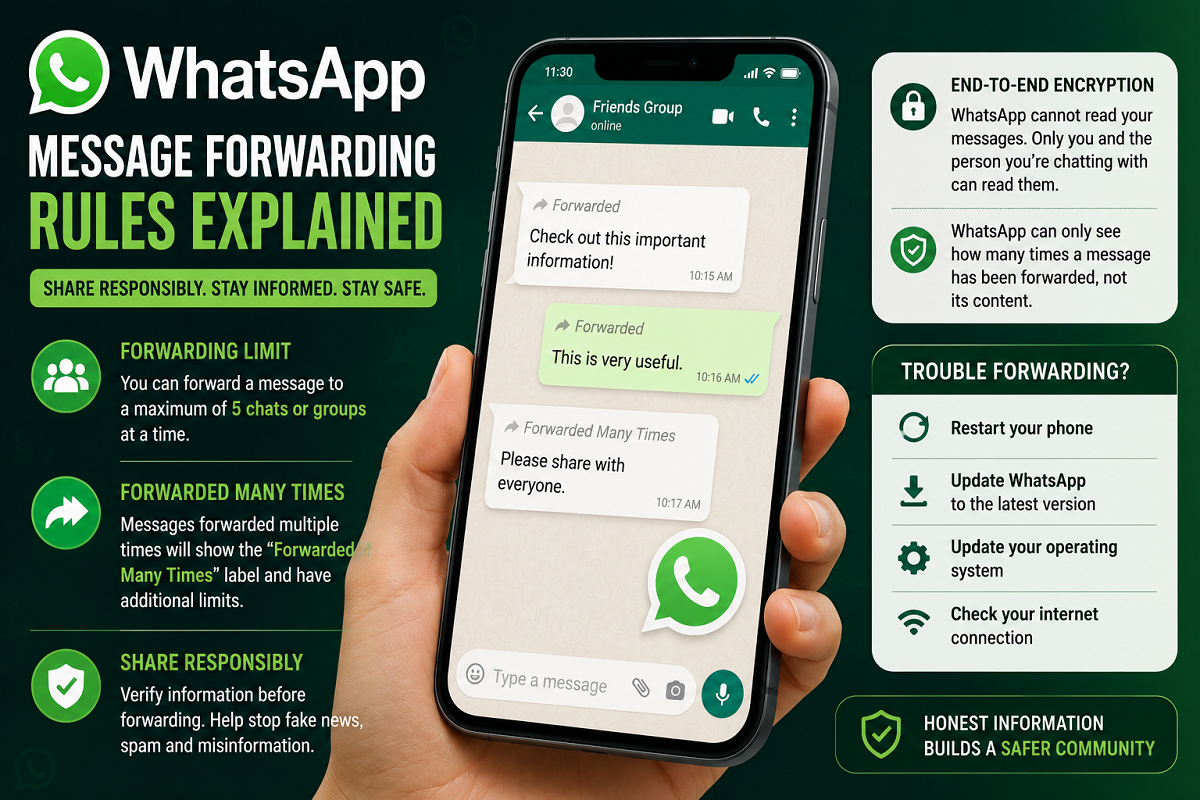
According to WhatsApp's forwarding policy, users can forward a message to a maximum of five individual chats or groups at one time.
This limit applies to standard forwarded messages and is intended to prevent mass distribution of content in a single action.
If you want to share a message with more people, you would need to repeat the forwarding process manually.
Extra Restrictions on Frequently Forwarded Messages
WhatsApp applies stricter controls to messages that have already been shared widely.
When a message has been forwarded multiple times and receives the "Forwarded Many Times" label, additional restrictions come into effect.
These messages cannot be rapidly distributed to large numbers of chats at once, reducing the likelihood of misinformation spreading across the platform.
The company says these measures have significantly reduced the viral spread of misleading content.
Can WhatsApp Read Your Forwarded Messages?
One of the most common concerns among users is whether WhatsApp can see the content of forwarded messages.
The answer is no.
WhatsApp uses end-to-end encryption, meaning that only the sender and intended recipient can read the messages exchanged in a chat.
What End-to-End Encryption Means
- Messages are encrypted before being sent.
- Only the sender and recipient have access to the content.
- WhatsApp cannot read personal conversations.
- Third parties cannot access the message content during transmission.
This security system applies to personal chats, group conversations, media sharing, and forwarded messages.
What Information Can WhatsApp See?
Although WhatsApp cannot read message content, the platform can detect certain metadata related to message forwarding.
For example, WhatsApp can identify:
- Whether a message has been forwarded.
- How many times it has been forwarded.
- Whether it qualifies for the "Forwarded Many Times" label.
However, the actual text, images, videos, or files contained within the message remain inaccessible to the company due to encryption.
What To Do If Message Forwarding Isn't Working
Sometimes users encounter issues while forwarding messages even when they have not exceeded the forwarding limit.
In such situations, WhatsApp recommends several troubleshooting steps.
Restart Your Device
A simple phone restart can resolve temporary app-related issues.
Update WhatsApp
Using an outdated version of WhatsApp may cause forwarding problems or prevent access to newer features.
Always install the latest version available for your device.
Update Your Operating System
Older versions of Android or iOS can sometimes create compatibility issues with messaging apps.
Keeping your device updated ensures smoother performance.
Check Your Internet Connection
A weak or unstable internet connection can interrupt message forwarding and other WhatsApp functions.
Share Responsibly
While WhatsApp makes communication quick and convenient, users should always verify information before forwarding it to others. Messages containing unverified claims, rumors, or sensational content should be fact-checked before sharing.
By following WhatsApp's forwarding rules and practicing responsible sharing, users can help create a safer and more reliable messaging environment for everyone.