NEWS
If you accidentally sent a message to someone on Instagram, then unsend it like this, learn how
Today, Instagram isn't just a platform for sharing photos and videos; people also use it extensively for chatting. Sometimes, in a hurry, we send a message to the wrong person or send a message that we later want to delete. In such situations, Instagram's Unsend Message feature is very useful.
TVMore videos
In this article, we will learn how to unsend a message sent on Instagram, what happens after that, and what things should be kept in mind.
What is Instagram Message Unsend?
Unsending means completely removing the message you sent from the chat. After unsending, the message is removed from both your and the other person's chat.
However, if the other person has already read the message or taken a screenshot of it, they may retain that information even after unsending.
How to unsend messages on Instagram
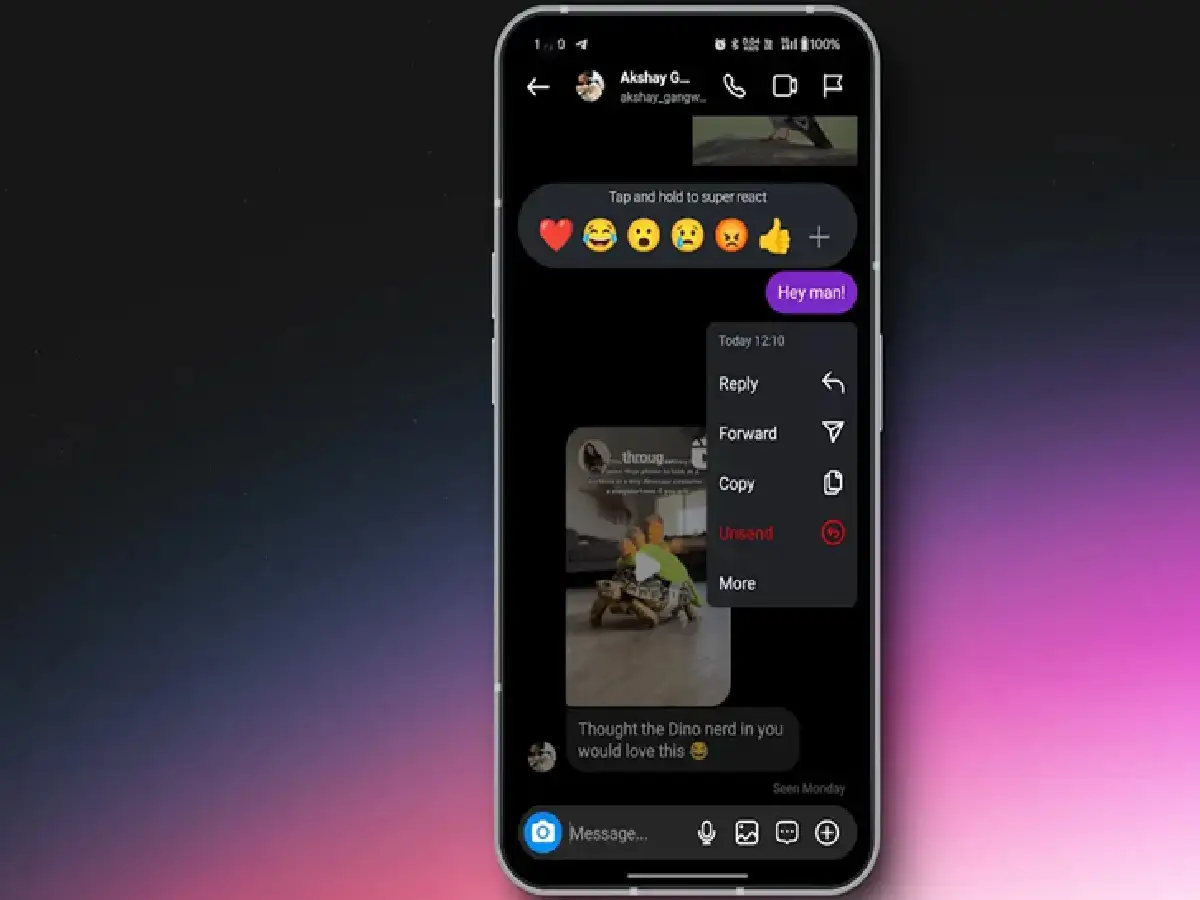
To delete a sent message on Instagram, follow the steps below:
Open the Instagram app on your mobile.
Tap the Messages (DMs) icon in the top right.
Open the chat in which you sent the message.
Press and hold the message you want to delete for a few seconds.
Tap Unsend in the options that appear.
After confirming, your message will be removed from the chat.
Does the other person notice after you unsend?
Instagram doesn't indicate that you've unsent a message through a separate notification. However, if the other person was viewing the chat or had already read the message, they may notice that a message has been deleted.
Can old messages also be unsend?
Yes. You can unsend old messages on Instagram. There's no time limit for this. You can unsend messages as long as the chat is still active.
PC: Beebom