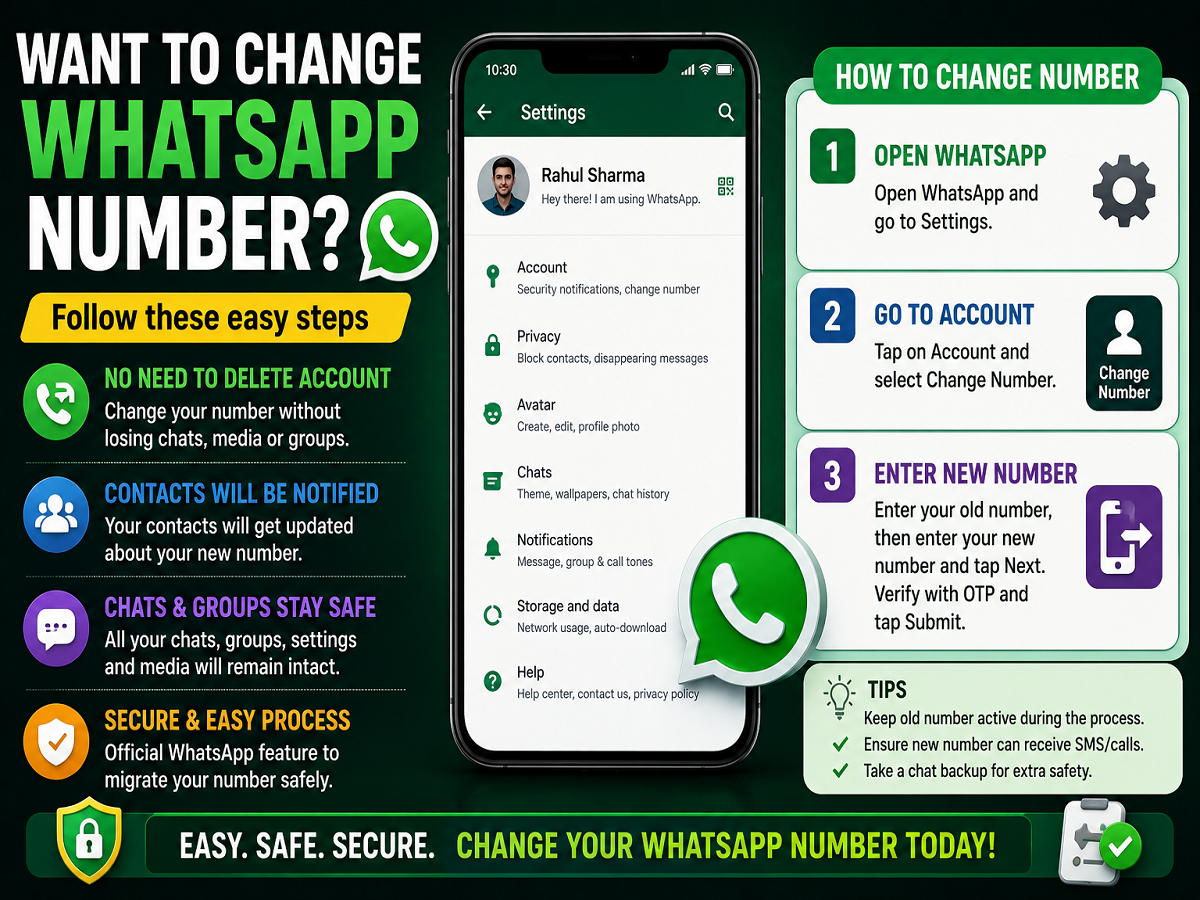
WhatsApp allows users to change their registered mobile number without deleting the account or losing chats, media, and groups. Many users are unaware that WhatsApp already includes a built-in “Change Number” feature that safely transfers account information from the old number to the new one.
This feature is especially useful when:
- Changing SIM cards
- Switching to a new phone number
- Moving to another telecom provider
- Deactivating an old number
Technology experts recommend using WhatsApp’s official number-change feature instead of creating a brand-new account, because it helps preserve:
- Chat history
- Group memberships
- Settings
- Profile information
No Need to Delete Your WhatsApp Account
One of the biggest advantages of this feature is that users do not need to delete their WhatsApp account.
Instead, WhatsApp automatically shifts:
- Account details
- Chat backups
- Groups
- Settings
to the new number after verification.
However, users should ensure that:
- The old number is still accessible
- The new number can receive SMS or calls
- WhatsApp is updated to the latest version
Contacts Will Be Notified Automatically
An important point users should know is that WhatsApp may inform contacts about the number change.
Depending on privacy settings:
- All contacts
- Chats you interact with
- Selected contacts
can receive a notification that your number has been updated.
This helps friends, family members, and work contacts identify your new WhatsApp number easily.
Step-by-Step Guide to Change WhatsApp Number
Step 1: Open WhatsApp Settings
- Launch WhatsApp
- Go to Settings
On Android, tap the three-dot menu first.
Step 2: Open Account Section
Inside Settings:
- Tap “Account”
- Select “Change Number”
WhatsApp will display information explaining what happens during the process.
Step 3: Enter Old and New Numbers
- Enter your current WhatsApp number
- Enter the new number you want to use
- Tap “Next”
Step 4: Verify the New Number
WhatsApp will send:
- OTP via SMS
or - Verification call
to the new number.
Once verified, the account will move to the new mobile number.
What Happens After Changing the Number?
After successful verification:
- Your profile photo remains unchanged
- Existing chats stay available
- Group memberships continue
- Chat history remains intact
- Settings transfer automatically
Users usually do not lose data if the process is completed properly.
Important Things to Remember
Before changing the number, experts suggest:
- Taking a chat backup
- Updating WhatsApp
- Ensuring internet connectivity
- Keeping both SIM cards active temporarily
This reduces the risk of verification issues or data sync problems.
Why This Feature Is Useful
Many users earlier believed they needed to:
- Delete WhatsApp
- Reinstall the app
- Create a new account
whenever changing numbers. However, WhatsApp’s built-in migration tool makes the process much easier and safer.
The feature has become especially useful for:
- Professionals
- Students changing cities
- Users upgrading telecom plans
- People separating personal and work numbers
Digital Convenience With Better Security
Technology experts say using the official Change Number feature is much safer than creating duplicate accounts or manually transferring chats.
As messaging apps become central to daily communication, understanding these built-in tools can help users manage accounts more efficiently while protecting important data and conversations.