NEWS
Smartphone Apps Secretly Collect More Data Than You Think — Here’s Which Permissions You Should Never Ignore
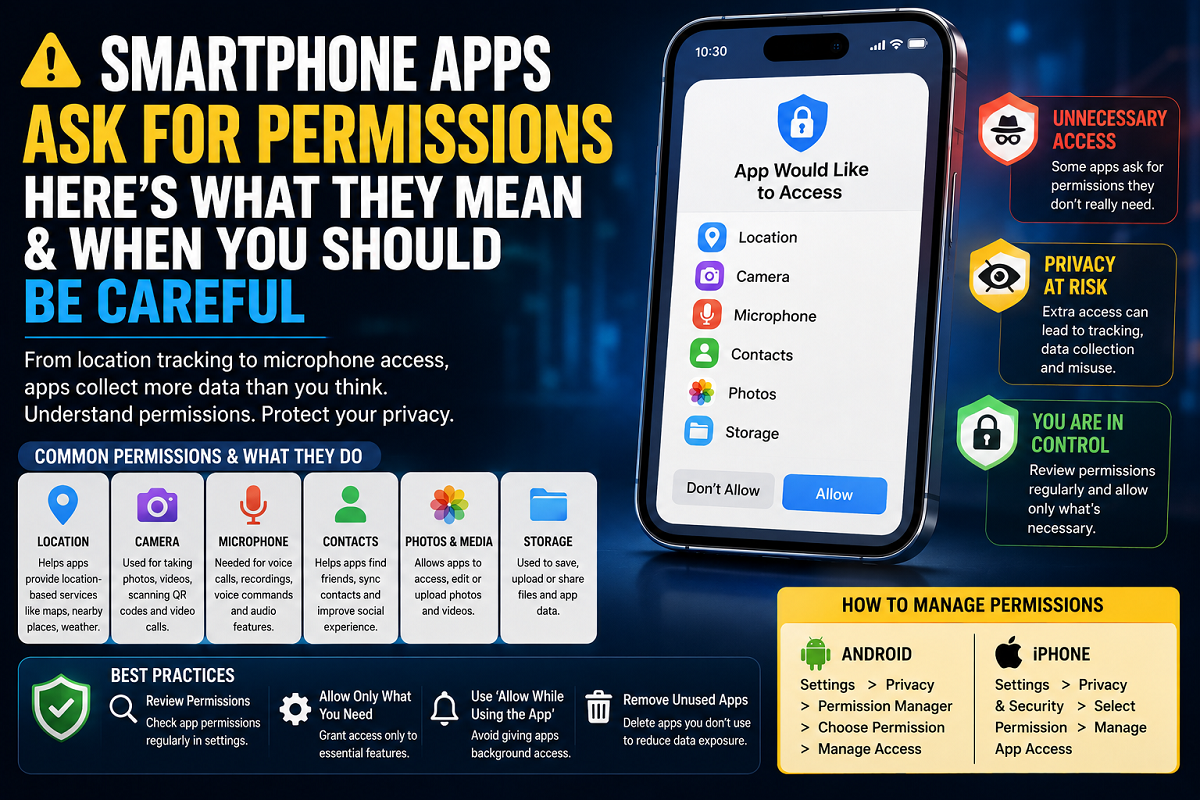
Every smartphone user encounters the same thing almost daily — apps demanding access to personal data before they can be used properly. Whether it is a social media platform, gaming app, camera tool, shopping application, or food delivery service, permission pop-ups have become a normal part of modern digital life.
Most people instantly tap “Allow” without paying attention because denying access often interrupts the app setup process. However, cybersecurity experts say this habit may expose users to unnecessary privacy risks.
From microphone access and contact lists to real-time location tracking, many apps request permissions that go far beyond their actual purpose. While some permissions are essential for apps to function correctly, others may simply help companies gather user data for advertising, analytics, or tracking behavior.
Understanding what these permissions actually mean — and knowing when to reject them — is becoming increasingly important in today’s smartphone-driven world.
Why Smartphone Apps Request Permissions in the First Place
Permissions are essentially requests that allow apps to access specific hardware features or personal information stored on a smartphone.
In many cases, these requests are completely reasonable.
For example:
- Navigation apps need GPS access to provide directions
- Video calling apps require microphone and camera access
- Photo editing apps need permission to open gallery images
- Food delivery services use location tracking to find nearby restaurants and monitor deliveries
- Fitness applications access activity data to count steps and track workouts
Without these permissions, many app features simply would not function properly.
Developers design apps around these permissions to make the user experience smoother, faster, and more convenient.
However, not every permission request is always necessary.
Many Apps Use Permissions to Collect User Data
A large number of free apps earn revenue through advertising and user behavior analysis. Because of this, user data has become one of the most valuable digital resources for technology companies.
Permissions can help apps gather information such as:
- Real-time location
- Search habits
- Shopping interests
- Device activity
- Contact networks
- App usage patterns
This data is often used to personalize advertisements, recommend products, and analyze consumer behavior.
For example, if multiple apps know where a user frequently travels, companies can predict interests, routines, and spending habits with surprising accuracy.
That is one major reason privacy experts advise users to carefully review permission requests instead of blindly approving every pop-up.
Some Permission Requests Should Immediately Raise Questions
One simple rule can help users decide whether a permission request feels suspicious:
“Does this app truly need this access to perform its main function?”
If the answer feels unclear, users should think twice before granting permission.
For instance:
- A navigation app requesting location access makes sense
- A camera app asking for photo storage permission is normal
- A messaging app needing microphone access for voice notes is expected
But some requests feel unnecessary.
Examples that often raise privacy concerns include:
- Calculator apps asking for microphone access
- Flashlight apps requesting contact permissions
- Offline games demanding constant GPS tracking
- Wallpaper apps seeking camera permissions
In such situations, users should carefully review whether the permission actually matches the app’s functionality.
Understanding the Most Common Smartphone Permissions
Location Access
This permission allows apps to track where a user is in real time.
Often needed for:
- Maps
- Ride-booking services
- Weather apps
- Delivery platforms
However, permanent background location access can also allow apps to track movement patterns continuously.
Experts usually recommend selecting “Allow only while using the app” whenever possible.
Camera Permission
This gives apps access to the smartphone camera.
Usually required for:
- Video calling
- QR code scanning
- Photography features
Apps without obvious camera-related functions should not normally require this permission.
Microphone Access
Allows apps to record audio.
Commonly used for:
- Voice messages
- Audio recording
- Video calls
Because microphones can potentially capture sensitive conversations, users should be cautious about granting this permission unnecessarily.
Contacts Permission
Lets apps view stored phone contacts.
Used by:
- Messaging apps
- Social media platforms
- Contact synchronization services
Sharing contact lists with unnecessary apps may expose personal information about friends, family, and coworkers.
Photos and Storage Permission
Allows apps to access files, photos, and videos stored on the device.
Generally needed for:
- Media editing apps
- Social media uploads
- File sharing services
This permission is usually safe when directly connected to media-related functionality.
Some Permissions Are Requested Automatically
Interestingly, developers do not always manually add every permission request themselves.
Many apps include third-party advertising systems, analytics software, or pre-built developer tools that automatically require certain permissions.
As a result, some apps may request access to features users never actually use inside the app.
This is one reason smartphone permission lists sometimes appear much longer than expected.
Android and iPhone Now Offer Better Privacy Controls
Modern smartphones provide users with much greater control over app permissions than in the past.
Both Android and iPhone devices now allow users to:
- Approve permissions temporarily
- Deny access completely
- Allow access only during app usage
- Review which apps recently used the camera or microphone
- Monitor background activity
These controls help users reduce unnecessary tracking while still using apps normally.
How to Check App Permissions on Android
Android users can manage permissions by following these steps:
- Open Settings
- Tap Privacy or Permission Manager
- Select a permission category
- View apps with access
- Allow, deny, or restrict permissions individually
Android devices also display indicators whenever the camera or microphone is actively being used.
How to Manage Permissions on iPhone
iPhone users can review permissions through:
- Open Settings
- Tap Privacy & Security
- Select a permission type
- Manage app access individually
Apple also offers options like:
- Approximate location sharing
- Tracking prevention
- Limited photo access
- Temporary permissions
These features provide more transparency regarding how apps use personal data.
Why Users Should Pay More Attention Today
Smartphones now contain highly personal information including:
- Banking details
- Private conversations
- Photos and videos
- Health data
- Real-time locations
- Work documents
Granting unnecessary permissions may increase privacy risks if apps misuse data or experience security breaches.
Cybersecurity experts say users do not need to reject every permission request, but they should become more selective and aware.
Smart Permission Habits Can Improve Privacy
Simple habits can significantly improve smartphone security and privacy, including:
- Reviewing app permissions regularly
- Removing unused apps
- Installing apps only from trusted stores
- Limiting background access
- Denying permissions that feel unnecessary
As mobile apps become increasingly integrated with artificial intelligence, targeted advertising, and data analytics, understanding app permissions is no longer optional — it is becoming an essential part of staying safe online.