NEWS
Fake WhatsApp App Alert 2026: Over 5 Lakh Downloads Reported, Check These Warning Signs to Stay Safe
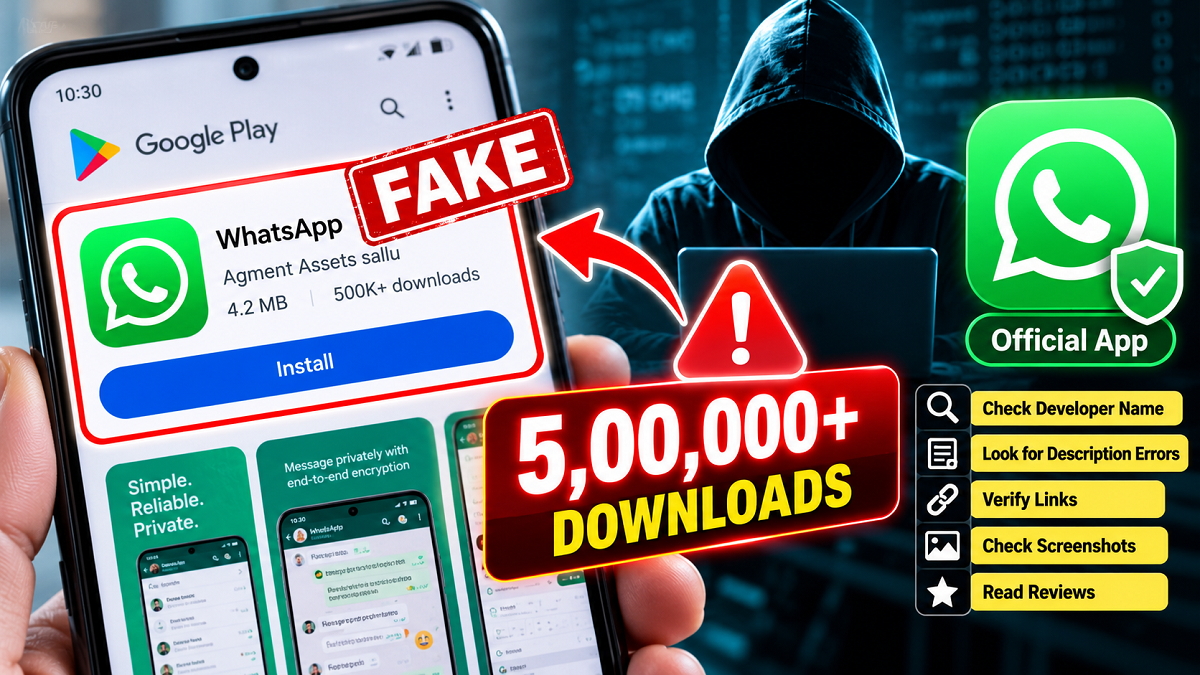
WhatsApp Security Alert 2026: Millions of smartphone users rely on WhatsApp every day to communicate with family, friends and colleagues. However, a recent report about a counterfeit application resembling the popular messaging platform has raised fresh concerns about mobile security. The suspicious app reportedly appeared on the Google Play Store and recorded more than 500,000 downloads, potentially exposing unsuspecting users to security risks.
According to the report, the imitation application used WhatsApp-like branding, screenshots and descriptions to make itself appear legitimate. Its appearance among sponsored search results allegedly increased the likelihood of users mistaking it for the official messaging service.
The incident highlights why Android users should verify an application's developer and other details before installing it, even when they find it through a familiar app marketplace.
Fake WhatsApp Application Reportedly Crossed 500,000 Downloads
The suspicious application was reportedly available on Google Play from September 2026 and attracted attention after a Reddit user identified as "2ne1cheese" shared screenshots highlighting irregularities in its listing.
The report claimed that the application had accumulated more than five lakh downloads before concerns about its authenticity became widely discussed.
One particularly concerning detail was its alleged placement within sponsored search results. Users searching for WhatsApp could potentially encounter the imitation application prominently displayed alongside legitimate search listings.
Because the application reportedly copied WhatsApp's familiar visual identity, some users may not have immediately recognised the difference.
The reported download count has not been independently verified, and the available information does not establish how many users, if any, suffered data theft or financial losses.
How Did the Suspicious Application Resemble the Original WhatsApp?
The imitation application reportedly used several design elements associated with the genuine messaging platform.
These included a familiar-looking icon, similar promotional graphics and a description closely resembling that of the official application.
The app was reportedly around 42MB in size, which could have made it appear like an ordinary messaging application to users who did not examine the listing carefully.
However, its presentation reportedly contained several inconsistencies that helped raise suspicion.
Cybersecurity experts generally recommend examining more than an application's name and icon because fraudulent developers can reproduce visual branding with considerable accuracy.
Five Warning Signs That Can Help Identify a Fake WhatsApp App
Users concerned about potentially misleading applications should examine the following details before downloading or installing WhatsApp.
1. Check the Developer's Identity
One of the clearest warning signs in the reported case was the developer information.
The genuine WhatsApp Messenger application is published under the name WhatsApp LLC on Google Play.
However, the suspicious application was reportedly associated with a publisher identified as "Agment Assets sallu."
A developer name that does not match the official publisher should prompt users to investigate further rather than proceeding with installation.
2. Look for Errors in the App Description
The counterfeit listing reportedly copied much of the genuine application's description.
However, unusual spacing and formatting inconsistencies were visible in the text.
Such errors can indicate that a listing has been hastily copied or assembled to imitate an established product.
Although grammatical mistakes alone do not prove that an application is fraudulent, they can be useful warning signs when combined with other irregularities.
3. Examine Privacy Policy and Information Links
The suspicious application reportedly included links labelled "Terms of Service" and "Learn More."
According to the report, these links did not function properly.
Before installing an unfamiliar application, users should check whether its privacy policy, developer website and support information are accessible and credible.
Broken links or misleading destinations may indicate that the listing has not been created by a trustworthy publisher.
4. Inspect Screenshots for Unusual Details
Promotional screenshots are intended to show how an application works.
In this case, the suspicious listing reportedly displayed the same screenshot more than once.
Repeated images, inconsistent interface designs and copied promotional graphics can suggest that a developer is attempting to imitate another application.
Users should compare the screenshots with those shown on the verified official listing.
5. Be Cautious When Ratings and Reviews Are Unavailable
The questionable application reportedly appeared with an Early Access designation, limiting the visibility or availability of user reviews.
This made it more difficult for prospective users to assess the application's reliability through public feedback.
However, an Early Access label does not automatically indicate fraud. Many legitimate applications use testing programmes before their full release.
Users should evaluate the publisher's identity, permissions and official website rather than relying exclusively on ratings.
How to Check Whether WhatsApp Installed on Your Phone Is Genuine
Android users can verify their installed messaging application by following a few simple steps.
- Open the Google Play Store on your smartphone.
- Search for "WhatsApp Messenger."
- Open the application listing and check whether the developer is identified as WhatsApp LLC.
- Compare the listing with the application already installed on your device.
- Check the app's permissions through your phone's Settings menu.
- If you discover an unfamiliar imitation, remove it and install the official application through a trusted source.
Users can also visit the official WhatsApp website at whatsapp.com/download to find legitimate download options.
What Should You Do If You Have Installed a Fake WhatsApp App?
Anyone who suspects that they installed a counterfeit messaging application should act promptly to reduce potential security risks.
Start by uninstalling the suspicious application and reviewing the permissions it previously requested.
If the application had access to contacts, storage, messages or other sensitive information, consider whether additional protective steps are necessary.
Users should also run a Google Play Protect scan, update their Android software and review recently installed applications.
If they entered passwords, verification codes or financial details into the suspicious application, they should secure the affected accounts immediately.
For WhatsApp itself, enabling two-step verification provides an additional layer of account protection.
This feature can be accessed through WhatsApp's Settings, under Account and Two-step verification.
Users should also check their linked devices and remove unfamiliar sessions.
Can Fake Messaging Apps Steal Personal Information?
Applications that impersonate trusted services can present serious privacy and security risks, depending on their actual capabilities and the permissions granted by users.
A malicious application may attempt to collect personal information, display deceptive advertisements, redirect users to fraudulent websites or obtain access to sensitive device functions.
Some applications may also attempt to trick users into sharing one-time passwords or other authentication information.
However, the presence of a suspicious application does not automatically establish that it contains malware or has stolen user data.
In the reported WhatsApp imitation case, the source does not provide technical evidence confirming specific malicious behaviour.
Users should therefore treat the incident as a security warning without assuming that every reported download resulted in compromised information.
Why Smartphone Users Should Be Careful With Sponsored App Listings
Sponsored search placements are commonly used by legitimate developers to promote applications.
Nevertheless, an advertisement appearing near the top of search results should not be interpreted as independent confirmation that an application is authentic.
Users should verify the publisher and other relevant information before downloading software.
This precaution is particularly important when setting up a new smartphone, reinstalling applications after a factory reset or following links received through social media and messaging platforms.
Final Word: Verify Before You Download
The reported fake WhatsApp listing serves as a reminder that familiar logos and professional-looking application pages are not sufficient proof of authenticity.
With more than 500,000 downloads claimed in the report, the incident has highlighted the importance of checking developer credentials, application permissions and official download sources.
For Android users, the safest approach is to install WhatsApp through its verified publisher or official website, keep their devices updated and remain alert to suspicious applications.
A few extra seconds spent checking an app's authenticity can help protect personal conversations, account access and sensitive information from potential cyber threats.