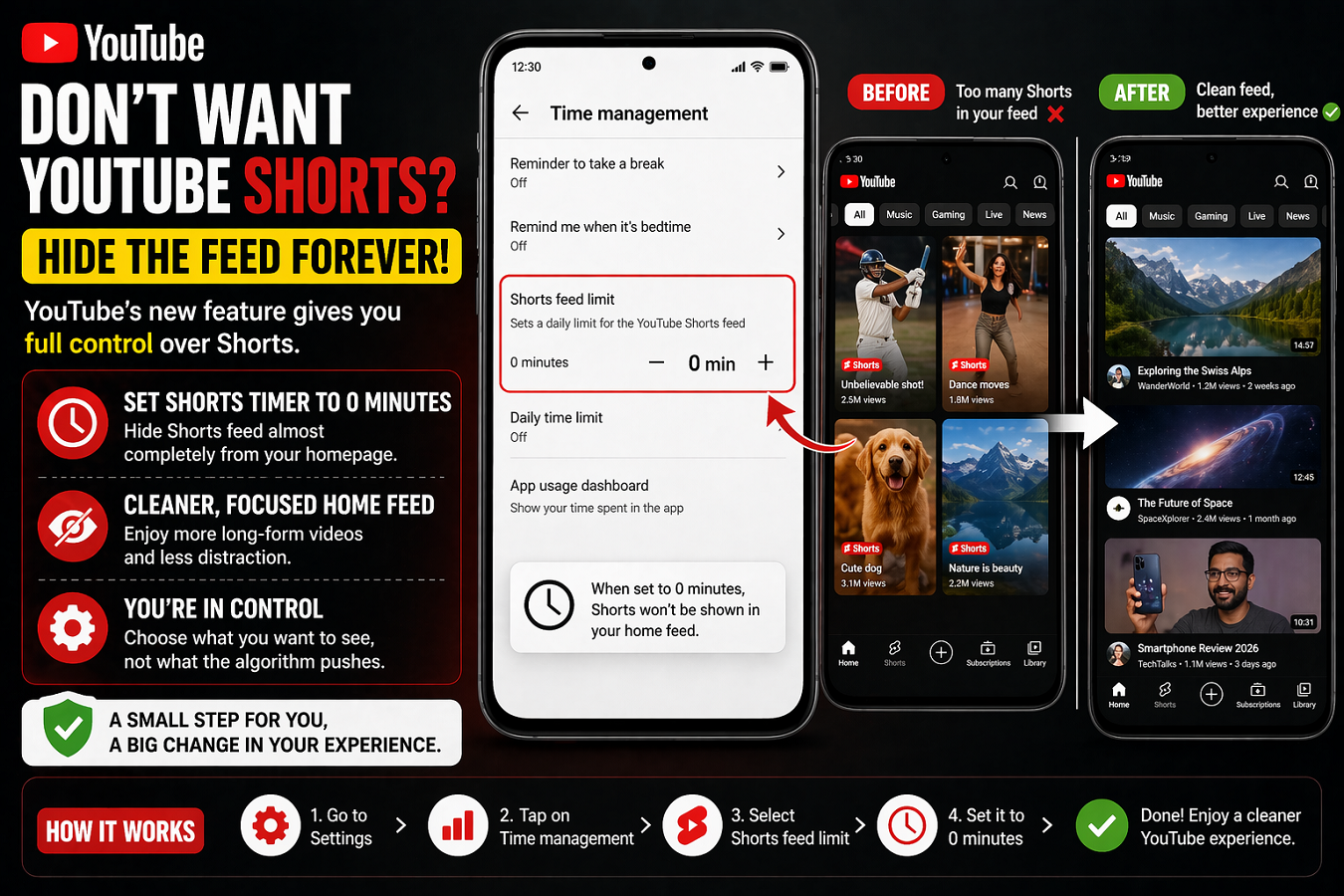
YouTube has introduced a new feature that gives users greater control over their viewing experience by allowing them to limit or almost completely hide Shorts content. This update is aimed at users who find short-form videos distracting and prefer a cleaner, more focused homepage.
Set Shorts Timer to 0 Minutes
The biggest highlight of this update is the ability to set the Shorts viewing timer to 0 minutes. Earlier, YouTube allowed users to restrict Shorts consumption between 15 minutes and 2 hours. Now, with this new option, users can effectively stop Shorts from appearing frequently in their feed.
Once the timer is set to zero, the platform treats the limit as already reached—reducing the visibility of Shorts on the homepage.
How to Disable Shorts Feed
To use this feature, follow these simple steps:
- Open the YouTube app
- Go to Settings
- Navigate to Time Management
- Select Shorts Feed Limit
- Set the timer to 0 minutes
After applying this setting, the continuous scroll of Shorts videos on the home feed will be significantly reduced.
Not Completely Gone, But Much Less Visible
It’s important to note that this feature does not entirely remove Shorts from the platform. Users may still see some Shorts content in sections like:
- Subscriptions
- Search results
- Creator channels
However, the endless stream of Shorts on the homepage will largely disappear, making the browsing experience less distracting.
Why YouTube Introduced This Feature
YouTube originally launched Shorts to compete with platforms offering short-form content, such as TikTok. Over time, the feature became heavily integrated into the app, with algorithms pushing short videos aggressively.
While many users enjoy quick, engaging clips, others have raised concerns about:
- Reduced visibility of long-form videos
- Increased screen time and distraction
- Repetitive or low-quality content
This new feature appears to be YouTube’s response to those concerns, offering more flexibility and personalization.
A Cleaner, More Focused Experience
By limiting Shorts, users can:
- Focus more on long-form content
- Reduce unnecessary scrolling
- Improve productivity and screen habits
- Customize their content experience
This update is especially useful for users who use YouTube for learning, research, or professional purposes.
Final Thoughts
With this feature, YouTube is moving toward a more user-controlled experience. Instead of forcing content through algorithms, the platform is now giving users the ability to decide what they want to see—and what they don’t.
If you’ve ever felt overwhelmed by endless Shorts videos, this simple setting could help you take back control of your feed and enjoy a more meaningful viewing experience.