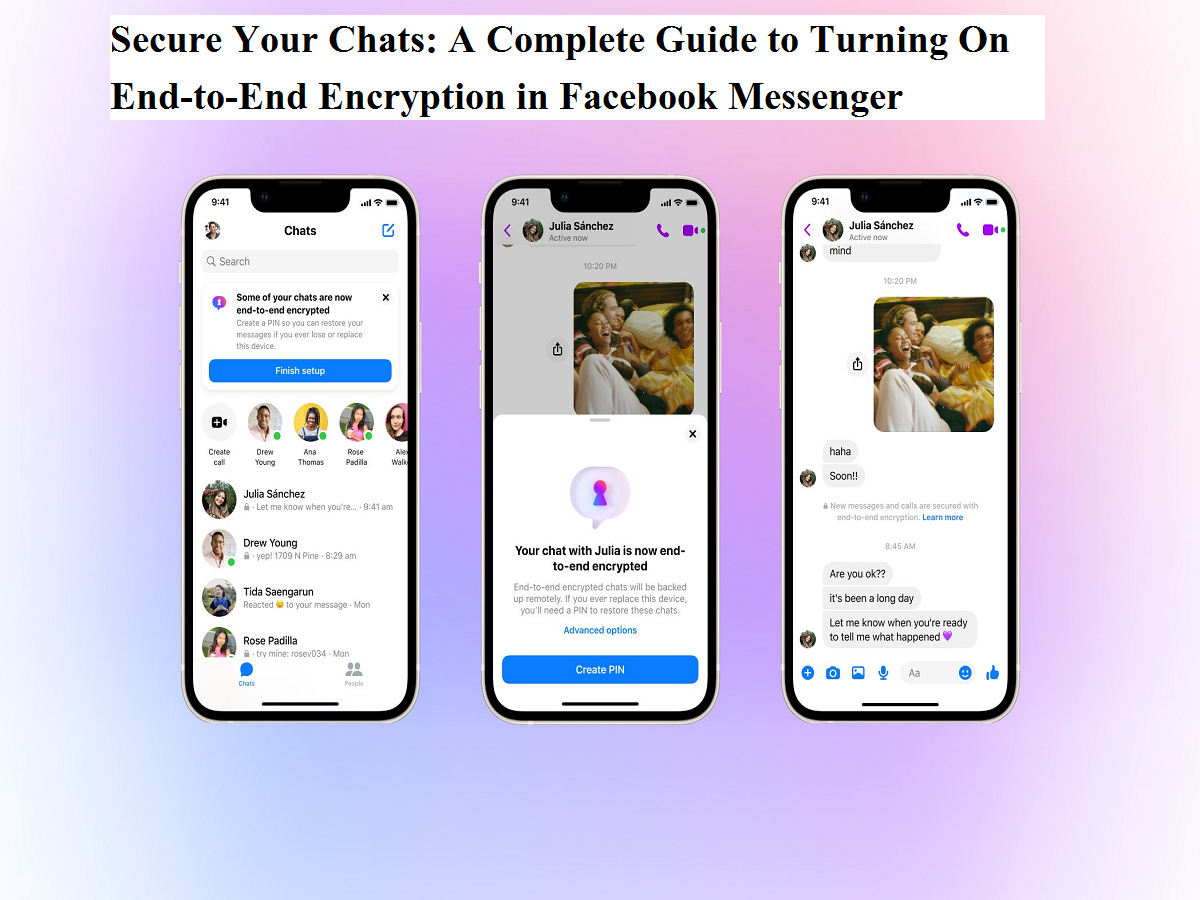
Online conversations have become a core part of everyday life, making privacy and security more important than ever. To address these concerns, Facebook Messenger offers an end-to-end encryption (E2EE) feature that adds an extra layer of protection to personal chats and calls. If you want to ensure that your private conversations stay private, here’s a simple and detailed guide explaining what end-to-end encryption is, how it works, and how you can enable it on Messenger.
What Is End-to-End Encryption?
End-to-end encryption is a security technology that ensures messages and calls are protected from the moment they leave your device until they reach the recipient’s device. In practical terms, this means that only you and the person you are communicating with can read messages or listen to calls. No third party—including the service provider itself—can access the content.
According to Meta, end-to-end encrypted conversations are designed so that even the company cannot see or hear what is shared. Messages are locked with encryption keys that only the sender’s and receiver’s devices possess, keeping chats safe from interception or unauthorized access.
How End-to-End Encryption Works on Messenger
When you send a message in an end-to-end encrypted chat, your device encrypts the message before it is transmitted over the internet. The encrypted data travels securely and can only be unlocked by the recipient’s device, which has the matching encryption key. The same process applies to voice and video calls, ensuring that real-time communication is also protected.
Each encrypted conversation uses unique keys stored on the participating devices. This device-level security ensures that even if data were intercepted during transmission, it would remain unreadable.
Step-by-Step: How to Enable End-to-End Encryption on Facebook Messenger
Enabling this feature on Messenger is straightforward and takes just a few taps:
- Open the Facebook Messenger app on your smartphone.
- Tap on the Chats tab at the bottom of the screen.
- Look for the Edit (pen-shaped) icon in the top-right corner and tap it.
- Turn on the lock icon toggle, which indicates a secure, encrypted chat.
- Select the contact you want to start an end-to-end encrypted conversation with.
Once these steps are completed, your new chat with that person will be protected by end-to-end encryption.
Important Things to Know About Encrypted Chats
While end-to-end encryption significantly improves privacy, there are a few points users should keep in mind:
- Encrypted voice and video calls cannot be reported directly within Messenger.
- If someone in an encrypted chat shares messages or media outside the conversation, the recipient of that shared content will be able to view or hear it.
- Certain chat customizations—such as nicknames, chat themes, and quick reactions—are not covered by end-to-end encryption.
Limitations of End-to-End Encryption on Messenger
Like any technology, Messenger’s encryption feature has limitations. On web browsers, encrypted messages may be stored locally in the browser’s data. If you clear cookies, use private browsing mode, or switch to a different browser, you may lose access to previous encrypted messages on that browser.
Additionally, end-to-end encryption is currently not available for business accounts or profiles belonging to public figures. This means personal accounts benefit the most from this privacy feature.
Why Enabling Encryption Matters
With growing concerns around data breaches, surveillance, and unauthorized access, enabling end-to-end encryption is a practical step toward better digital safety. It ensures that sensitive conversations—whether personal chats or private calls—remain confidential.
Final Thoughts
Turning on end-to-end encryption in Facebook Messenger is a simple yet powerful way to protect your communication. While the feature does have some technical and usage-based limitations, it offers strong security for everyday conversations. As always, users should remain mindful about what they share online, even within encrypted chats. Privacy tools are most effective when paired with informed and cautious digital behavior.