A Blue Aadhaar Card, also known as Child Aadhaar, is an important identity document for children below the age of five. While parents may not need it frequently, it becomes essential during school admissions, government scheme applications, passport processing, and several other official purposes.
If you've misplaced your child's Aadhaar card or need a digital copy urgently, you don't have to wait for a physical document. The Unique Identification Authority of India (UIDAI) allows parents to download their child's Aadhaar digitally through multiple official platforms.
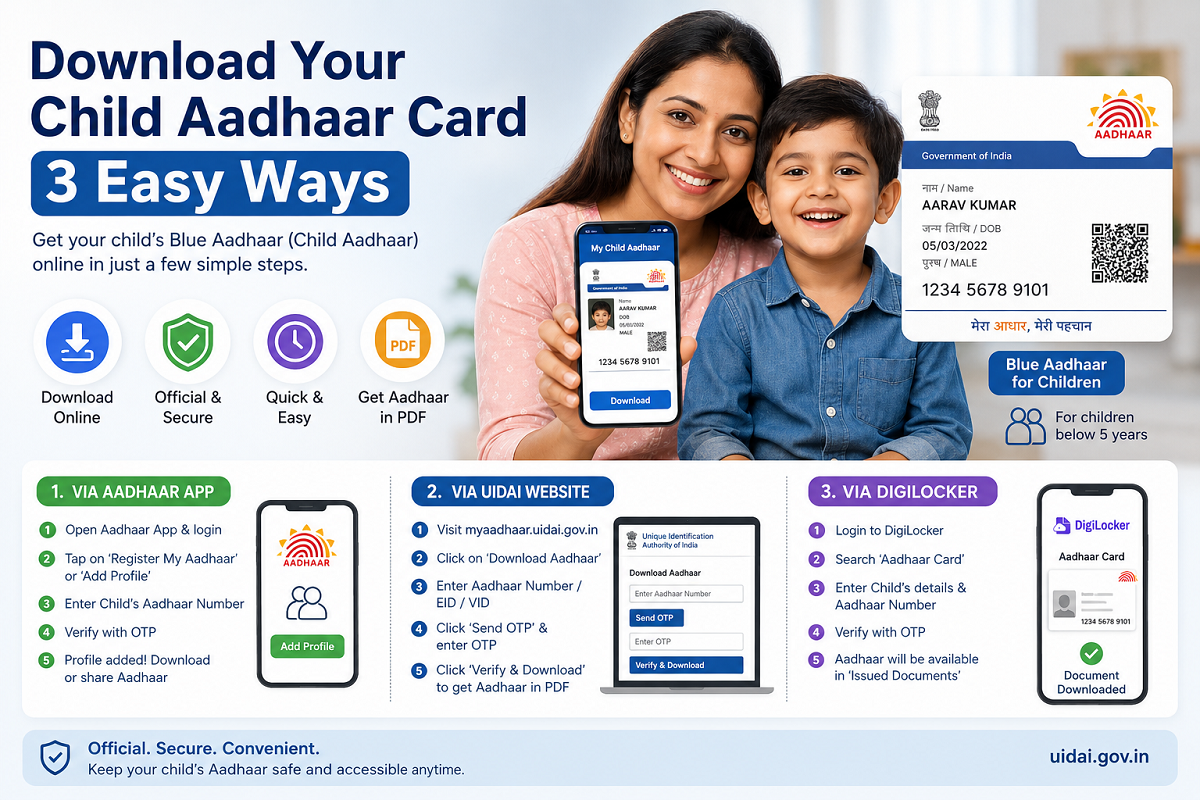
Here are three simple ways to download your child's Blue Aadhaar safely and securely.
What Is Blue Aadhaar?
Blue Aadhaar is issued to children below five years of age and differs from a regular Aadhaar card because it is not linked to biometric data at the time of enrolment. Once the child turns five, biometric details must be updated to keep the Aadhaar valid.
Parents can download the digital version whenever required using official UIDAI services.
Method 1: Download Child Aadhaar Using the Aadhaar App
The Aadhaar mobile application provides one of the easiest ways to access your child's Aadhaar digitally.
Follow these steps:
- Install the official Aadhaar app on your smartphone.
- Log in using your Aadhaar profile.
- Tap "Register My Aadhaar" or "Add Profile" on the home screen.
- Create a four-digit security PIN if prompted.
- Enter your child's 12-digit Aadhaar number.
- An OTP will be sent to the registered mobile number linked with the parent's Aadhaar.
- Enter the OTP to complete verification.
- After verification, your child's Aadhaar profile will be added to the app.
You can then view, download, or securely share the digital Aadhaar directly from the application whenever needed.
Method 2: Download Blue Aadhaar from the UIDAI Website
Parents can also download the Aadhaar card directly from the official UIDAI portal.
Follow these steps:
- Visit the official My Aadhaar portal.
- Select the Download Aadhaar option.
- Enter your child's Aadhaar Number, Enrolment ID (EID), or Virtual ID (VID).
- Click Send OTP.
- Enter the OTP received on the registered mobile number.
- Click Verify & Download.
- The Aadhaar card will be downloaded in PDF format to your device.
The downloaded file is password-protected. The password usually consists of the first four letters of the child's name in uppercase followed by the year of birth.
Method 3: Download Child Aadhaar Through DigiLocker
DigiLocker also allows users to securely store and access Aadhaar digitally.
To download the document:
- Open the DigiLocker app or website and sign in.
- Use the search bar to find Aadhaar Card.
- Select the Aadhaar service from the results.
- Grant permission to access Aadhaar information when prompted.
- Enter the child's details, including name, date of birth, gender, and Aadhaar number.
- Verify the request using the OTP sent to the registered mobile number.
- After successful verification, the Aadhaar card will appear in the Issued Documents section.
You can view, download, or share the digital document whenever required.
Why Keeping a Digital Copy Is Useful
Having a digital copy of your child's Aadhaar can save valuable time during urgent situations. It is commonly required for:
- School admissions.
- Government welfare schemes.
- Passport applications.
- Scholarship registrations.
- Banking or financial services.
- Identity verification for various official purposes.
Keeping the document stored securely on your smartphone or DigiLocker ensures quick access whenever needed.
Important Points to Remember
- Always download Aadhaar only through official UIDAI platforms or DigiLocker.
- Ensure the registered mobile number linked with Aadhaar is active to receive OTPs.
- Keep the downloaded PDF stored securely to protect personal information.
- Update your child's biometric details after they turn five years old to maintain Aadhaar validity.
By using the Aadhaar app, the UIDAI website, or DigiLocker, parents can quickly access their child's Blue Aadhaar without searching for the physical document, making important verification and admission processes much more convenient.