Slow internet while using your phone’s hotspot can be extremely frustrating—especially when you’re working on a laptop, attending video calls, or streaming content. Many users assume the issue is with their network provider, but in reality, the problem often lies in the default settings of your smartphone.
If your hotspot is not delivering the expected speed, here’s a complete guide to understand why it happens and how you can fix it easily.
Why Does Hotspot Speed Drop?
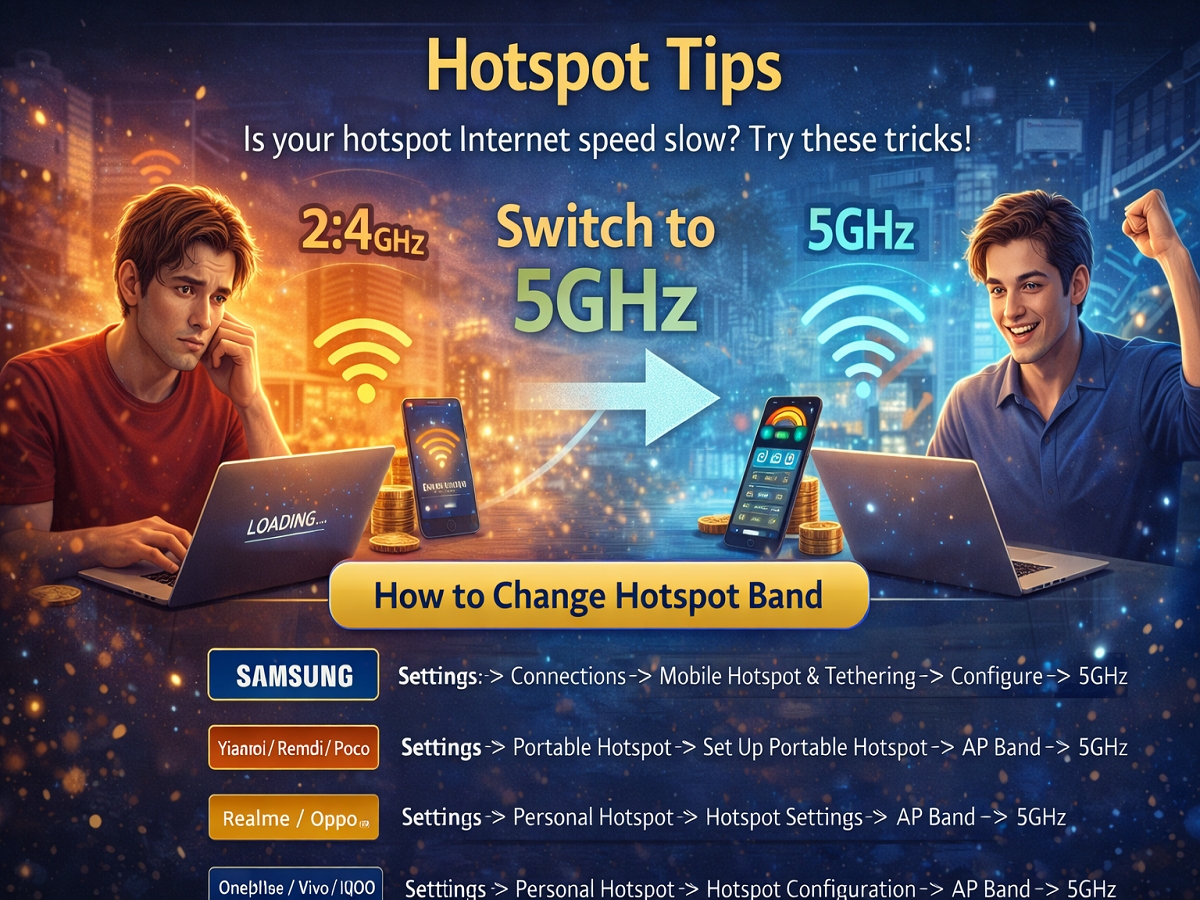
Most smartphones are set to use the 2.4GHz band by default for hotspot connections. While this band offers wider coverage, it comes with certain limitations:
- Slower data transfer speeds
- Higher chances of signal interference
- Congestion due to multiple devices using the same frequency
Think of it like this: your phone might be receiving fast internet (like a highway), but it shares that data through a crowded narrow lane (2.4GHz), reducing speed for connected devices.
The Real Solution: Switch to 5GHz Band
To unlock better performance, switching your hotspot to the 5GHz band can make a significant difference.
Benefits of 5GHz Hotspot
- Faster internet speed
- Lower latency (ideal for gaming and video calls)
- Less interference from nearby devices
However, keep in mind that 5GHz has a shorter range compared to 2.4GHz, so your connected device should be relatively close to your phone.
How to Change Hotspot Band on Different Smartphones
For Samsung Devices
Go to:
Settings → Connections → Mobile Hotspot & Tethering → Configure → Select 5GHz
For Xiaomi / Redmi / Poco
Go to:
Settings → Portable Hotspot → Set Up Portable Hotspot → AP Band → Select 5GHz
For Realme / Oppo
Go to:
Settings → Personal Hotspot → Hotspot Settings → AP Band → Select 5GHz
For OnePlus / Vivo / iQOO
Go to:
Settings → Personal Hotspot → Hotspot Configuration → AP Band → Select 5GHz
Additional Tips to Improve Hotspot Speed
- Keep your phone close to the connected device
- Limit the number of connected devices
- Turn off background apps using data
- Ensure your mobile data signal is strong (4G/5G)
- Restart your phone for better performance
Final Takeaway
If your hotspot speed is slow, don’t immediately blame your network. A simple change from 2.4GHz to 5GHz can significantly boost performance and improve your overall internet experience.
Try these settings today and enjoy smoother browsing, faster downloads, and uninterrupted streaming 👍