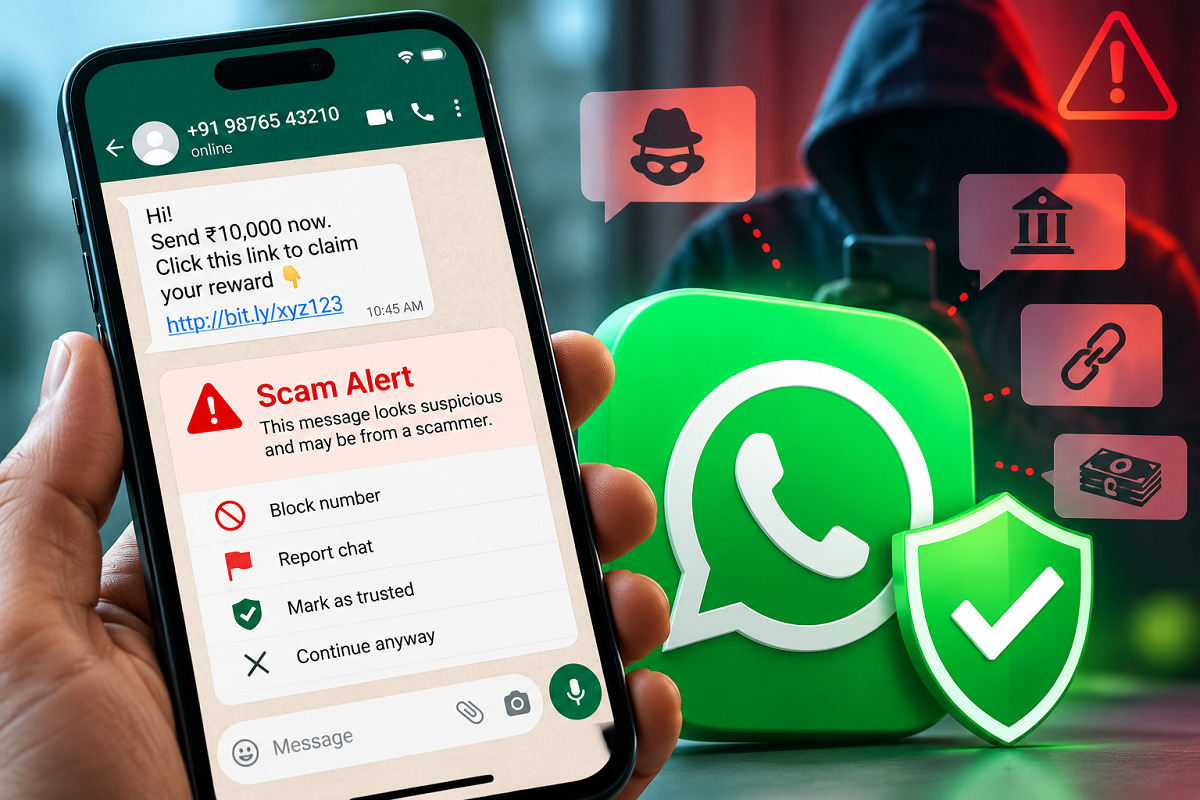
WhatsApp users regularly receive messages from unknown numbers, and while many may be harmless, some can be part of sophisticated online scams. Fraudsters often pretend to be bank officials, company representatives, delivery agents, friends or even family members to convince people to transfer money or disclose sensitive information.
To strengthen protection against such threats, WhatsApp is reportedly testing a scam warning feature designed to alert users when a conversation shows potentially suspicious characteristics. The feature could give people an additional warning before they respond to a questionable message or take an action that puts their money or personal information at risk.
The reported feature is not yet available to everyone. It is said to be undergoing limited testing, which means users should not assume that a Scam Alert option will already appear in their WhatsApp settings.
How Could WhatsApp's Scam Warning Feature Work?
The proposed protection is expected to focus particularly on interactions involving unfamiliar numbers and potentially risky messaging behaviour.
According to available details, WhatsApp may use machine-learning technology to identify patterns commonly associated with scam attempts. If suspicious signals are detected during a conversation, the app could display a warning directly inside the chat.
Such an alert would not necessarily mean that the sender has definitely committed fraud. Instead, it would serve as a precaution, encouraging the recipient to examine the conversation more carefully before responding.
Depending on the final implementation, users may be given options to block the sender, report the conversation, continue chatting despite the warning, or indicate that the conversation is trusted if they believe the alert was triggered incorrectly.
This distinction is important because a message coming from an unknown number is not automatically fraudulent. Legitimate businesses, delivery executives or people who are not saved in a user's contacts may also initiate conversations.
Where Could the Scam Alert Setting Appear?
For accounts included in the reported test, users may be able to look for the feature through WhatsApp's settings.
The reported path involves opening WhatsApp > Settings > Account and checking whether a Scam Alert-related option is available.
However, availability may vary between accounts and app versions. The feature has reportedly been spotted among a limited number of Android beta users, so most people may not see it even after installing the latest version of WhatsApp.
Users should therefore avoid downloading unofficial applications, modified APK files or third-party tools that promise to unlock the feature. Such software can create additional privacy and security risks.
If WhatsApp eventually expands the feature, eligible users should receive it through official app updates or server-side activation.
What About iPhone Users?
The reported scam-warning functionality appears to be in an early testing phase and is not currently described as being widely available to iPhone users.
That does not necessarily mean iOS devices will never receive the feature. WhatsApp frequently tests new capabilities with a limited group before deciding whether to release them more broadly.
Until WhatsApp announces a wider rollout, users should treat availability, supported platforms and the final name of the feature as subject to change.
Will WhatsApp Read Private Chats to Detect Scams?
Privacy is likely to be one of the biggest concerns surrounding any feature designed to analyse suspicious conversations.
According to the information currently available, the proposed system could analyse relevant messaging patterns on the user's device rather than requiring private chat content to be routinely sent to WhatsApp or Meta servers for scam detection.
The reported feature also would not automatically report every conversation it considers suspicious. Users are expected to remain in control of whether they want to report or block a particular sender.
Since the feature is still being tested, however, its final privacy design and functionality could change before a wider public release.
What Should You Do If WhatsApp Shows a Scam Warning?
A scam alert should be treated as a reason to examine the conversation carefully rather than as absolute proof that the sender is a criminal.
Be particularly cautious when an unknown person creates urgency and asks you to send money, disclose an OTP, reveal card details or immediately open a link.
Users should never share confidential information such as OTP codes, UPI PINs, ATM PINs, CVVs, passwords or banking credentials through WhatsApp. Avoid opening suspicious links or installing applications sent by unknown contacts.
If someone claims to represent a bank, government department or well-known company, independently verify the request using the organisation's official app, website or verified customer-support channel. Do not rely solely on the phone number or link supplied in the suspicious message.
Scam Detection Could Add Another Layer of WhatsApp Security
Online scammers are increasingly using social engineering instead of relying only on technical attacks. They often create urgency, impersonate trusted organisations or promise prizes and financial rewards to persuade victims to act before verifying the request.
A built-in warning system could therefore provide WhatsApp users with another layer of protection by drawing attention to conversations that appear potentially risky.
For now, though, the reported Scam Alert feature should be considered a limited beta/testing feature rather than a universally available WhatsApp setting. Users who do not see the option should wait for an official rollout instead of attempting to enable it through unofficial methods.
Regardless of whether the feature reaches all users, basic precautions remain essential: verify unexpected requests, avoid unknown links, never disclose banking credentials and block or report suspicious accounts when necessary.