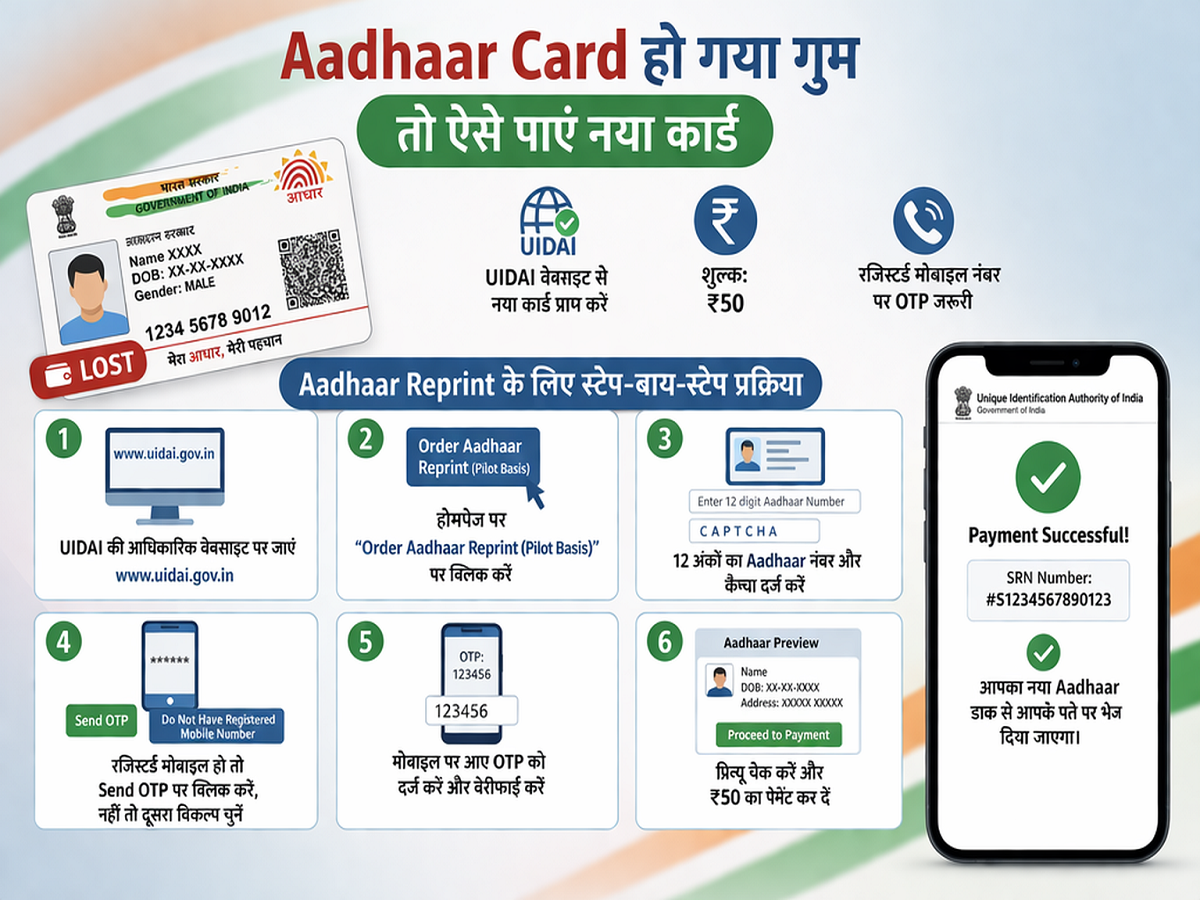
Losing your Aadhaar Card can feel stressful, especially since it is one of the most important identity documents in India. From banking to government services, Aadhaar plays a crucial role in daily life. But the good news is—you don’t need to panic. The process to get a duplicate Aadhaar card is simple, quick, and can be done online from the comfort of your home.
In this guide, we’ll walk you through the complete step-by-step process to reprint your Aadhaar card easily.
Why Aadhaar Card Is So Important
The Aadhaar Card is issued by the Unique Identification Authority of India and serves as a universal identity proof for Indian residents. It is required for:
- Opening bank accounts
- Filing income tax returns
- Availing government schemes
- Mobile SIM verification
- Address and identity proof
Losing it can disrupt many essential services, but thanks to digital services, getting a replacement is now hassle-free.
Can You Get a New Aadhaar Card Online?
Yes. The Unique Identification Authority of India offers an “Order Aadhaar Reprint” facility on its official website. With this service, you can request a new physical copy of your Aadhaar card for a nominal fee.
Charges for Aadhaar Reprint
To get your Aadhaar card reprinted, you need to pay a small fee of:
- ₹50 (inclusive of GST and delivery charges)
Once payment is successful, the card is printed and delivered to your registered address.
Things You Need Before Applying
Before starting the process, make sure you have:
- Your 12-digit Aadhaar number (or VID)
- Access to your registered mobile number (for OTP verification)
- Internet connection for online application
👉 If you don’t have access to your registered mobile number, you can still apply, but some features like preview may be limited.
Step-by-Step Process to Reprint Aadhaar Card
Follow these simple steps to order a duplicate Aadhaar:
Step 1: Visit Official Website
Go to the official website of Unique Identification Authority of India.
Step 2: Select Reprint Option
Click on the “Order Aadhaar Reprint” option available on the homepage.
Step 3: Enter Aadhaar Details
- Enter your 12-digit Aadhaar number
- Fill in the captcha code
Step 4: Verify via OTP
- Click on “Send OTP”
- Enter the OTP received on your mobile
👉 If your mobile is not registered, select the alternative option and enter a new number.
Step 5: Check Details
You will see a preview of your Aadhaar details such as:
- Name
- Date of Birth
- Address
Verify everything carefully before proceeding.
Step 6: Make Payment
Pay the ₹50 fee using available payment methods (UPI, card, net banking).
Step 7: Receive Confirmation
After successful payment:
- You will get a confirmation message
- A Service Request Number (SRN) will be sent to your mobile
You can use this SRN to track your Aadhaar delivery status.
What Happens After You Apply?
Once your request is submitted:
- Aadhaar is printed by UIDAI
- Dispatched via speed post
- Delivered to your registered address
Usually, it takes a few days for delivery depending on your location.
Important Tips to Remember
- Always double-check your details before payment
- Keep your Aadhaar number safe and secure
- Use only the official UIDAI website to avoid fraud
- Ensure your mobile number is active for OTP
Final Thoughts
Losing your Aadhaar Card is no longer a major issue. With the digital services provided by Unique Identification Authority of India, you can quickly request a reprint without visiting any office.
The entire process is user-friendly, affordable, and designed to save your time. So, if your Aadhaar card is lost or damaged, follow these steps and get a new one delivered right to your doorstep.