Apple has started rolling out iOS 26.5 beta with support for end-to-end encrypted RCS messaging, marking a major step toward more secure cross-platform communication between iPhone and Android users.
The update, developed in collaboration with Google, introduces encrypted Rich Communication Services (RCS) chats that aim to improve privacy and modernize messaging beyond traditional SMS technology.
The feature is gradually becoming available depending on carrier support and compatible devices.
What Is Encrypted RCS Messaging?
RCS, or Rich Communication Services, is considered the next-generation replacement for standard SMS messaging.
Unlike traditional text messaging, RCS supports:
- Read receipts
- Typing indicators
- High-quality media sharing
- Better group chats
- Internet-based messaging
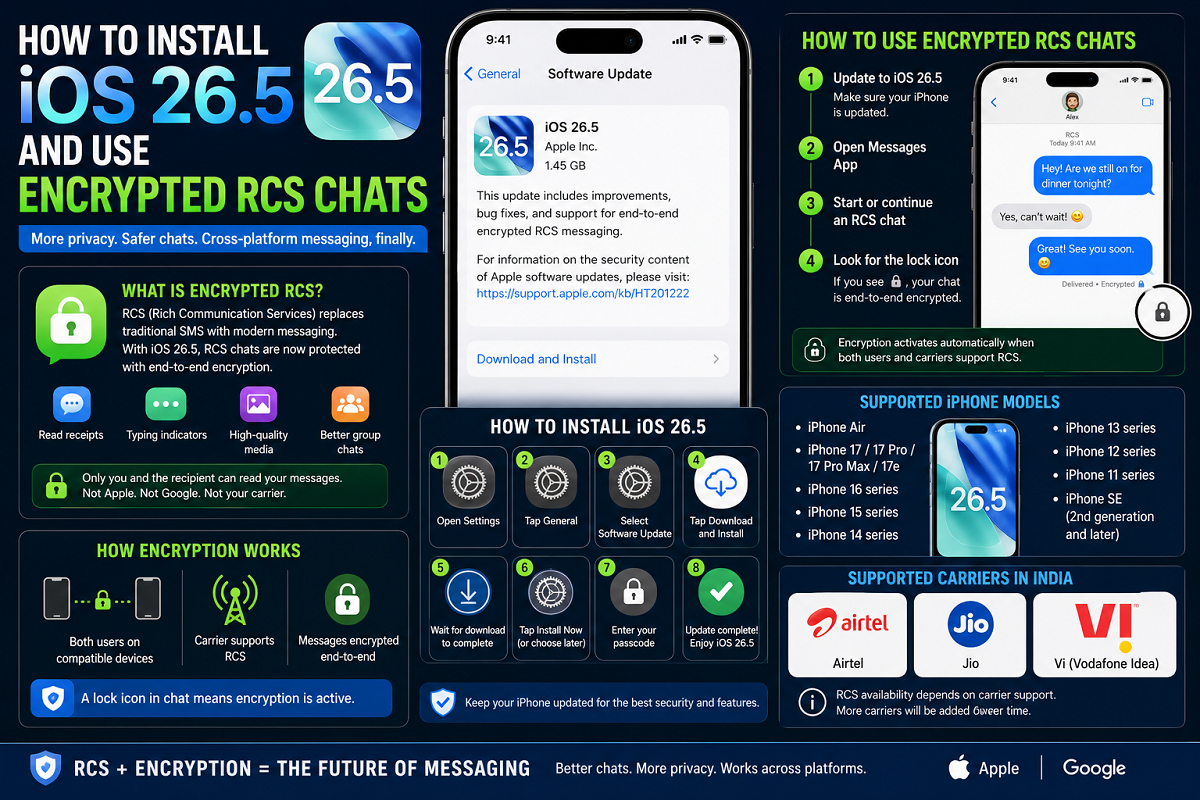
With iOS 26.5, Apple is now adding end-to-end encryption to supported RCS conversations.
This means messages remain protected while being transmitted between devices. According to the rollout details, only the sender and receiver can read the messages.
Third parties — including Apple, Google, telecom operators, or service providers — reportedly cannot access encrypted chat content.
A lock icon inside the conversation window indicates that encryption is active.
Which iPhones Support iOS 26.5?
The iOS 26.5 update with encrypted RCS support is reportedly available for the following iPhone models:
Supported Devices
- iPhone Air
- iPhone 17 series
- iPhone 16 series
- iPhone 15 series
- iPhone 14 series
- iPhone 13 series
- iPhone 12 series
- iPhone 11 series
- iPhone SE
How to Install iOS 26.5 on Your iPhone
Updating to iOS 26.5 is relatively simple. Users can install the update directly from the iPhone settings menu.
Step-by-Step Installation Guide
- Open the Settings app on your iPhone.
- Tap General.
- Select Software Update.
- Check whether iOS 26.5 is available for your device.
- Tap Download and Install.
- Wait for the update to finish downloading.
- Choose Install Now or schedule installation for later.
- Enter your passcode if prompted.
Once installation is complete, your iPhone will restart with the updated software.
How to Start Using Encrypted RCS Chats
After updating to iOS 26.5, users can begin using encrypted RCS messaging if their carrier and chat participants also support the feature.
How to Check if Encryption Is Working
- Open the Messages app.
- Start or continue an RCS conversation.
- Look for a lock icon inside the chat window.
If the lock icon appears, the conversation is protected with end-to-end encryption.
The encryption activates automatically when all compatibility requirements are met.
Important Conditions for Encrypted RCS to Work
Encrypted RCS messaging will only function properly if both users meet certain requirements.
Requirements Include
- Compatible smartphones
- Supported messaging apps
- Carrier support for RCS
- Updated software versions
If any of these conditions are missing, conversations may automatically switch back to standard SMS or unencrypted messaging.
Supported Carriers in India
According to Apple’s rollout information, RCS support depends heavily on telecom providers.
Currently supported Indian carriers reportedly include:
- Airtel
- Reliance Jio
- Vodafone Idea
Carrier support may expand gradually over time.
Why Encrypted RCS Matters
The update is important because it improves security in cross-platform messaging between iPhone and Android users.
Previously, secure end-to-end encryption was mainly limited to:
- iMessage
- Third-party apps like WhatsApp and Signal
Traditional SMS messages were not encrypted and could potentially be intercepted more easily.
Encrypted RCS now brings stronger privacy protections directly into the default messaging experience.
Apple and Google Moving Toward Better Messaging Standards
The collaboration between Apple and Google reflects broader industry efforts to modernize mobile messaging standards globally.
For years, messaging between Android and iPhone users lacked several modern features, often resulting in:
- Lower media quality
- Limited group chat support
- Missing typing indicators
- Reduced security
RCS aims to bridge many of those gaps.
The addition of encryption further strengthens the push toward safer and more feature-rich communication across platforms.
Rollout Still Expanding
The feature is currently rolling out gradually through the iOS 26.5 beta release and may not immediately appear for all users or carriers.
Apple has not yet confirmed a final global rollout timeline for stable public availability.
Users are advised to:
- Keep software updated
- Check carrier compatibility
- Monitor official Apple announcements
for future updates regarding encrypted RCS support.