Hidden Camera Detection Tips 2026: Staying in a hotel is usually an essential part of travelling, whether you are on a family vacation, business trip, or weekend getaway. Travellers expect hotel rooms to provide comfort, security, and personal privacy. However, concerns about hidden surveillance devices have made some guests more cautious about their surroundings.
A concealed recording device placed inside a private room can pose a serious threat to personal privacy. Although such incidents should not be assumed to be common in every hotel, understanding basic precautions can help travellers identify suspicious objects and respond appropriately.
The good news is that a smartphone may help detect certain signs associated with hidden cameras. While mobile phones cannot reliably identify every surveillance device, their cameras, flashlights, and wireless connectivity features can assist with a preliminary inspection.
Here are five practical methods travellers can use to examine a hotel room for possible hidden recording devices without purchasing expensive equipment.
1. Turn Off the Lights and Inspect the Room Carefully
One simple way to begin checking for suspicious devices is to examine the room under low-light conditions.
Some electronic devices produce small indicator lights, while certain camera systems use infrared illumination for recording in darkness.
Start by switching off the room lights and closing the curtains to reduce outside illumination.
Allow your eyes to adjust to the darker environment before examining the surroundings.
Pay particular attention to objects that have a direct view of the bed, changing area, or bathroom.
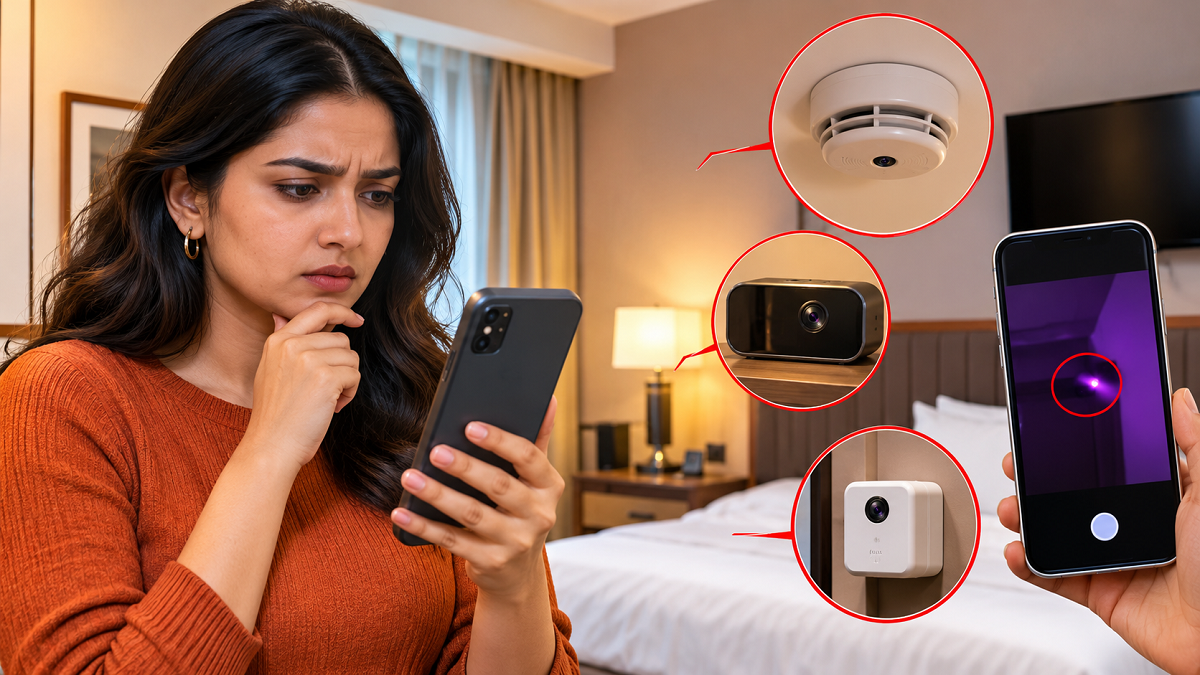
Common household items worth visually inspecting include alarm clocks, television units, smoke detectors, decorative objects, wall fixtures, and unusual electronic accessories.
Look for unfamiliar openings, tiny reflective surfaces, or lights appearing in unexpected locations.
However, a blinking light or small opening does not necessarily indicate the presence of a hidden camera. Many legitimate electronic devices contain sensors and indicator lights.
Avoid dismantling fixtures or interfering with safety equipment during the inspection.
2. Use Your Smartphone Camera to Look for Infrared Light
Some surveillance cameras use infrared illumination to capture images in low-light environments.
Infrared light is generally invisible to the human eye, but certain smartphone camera sensors can detect some infrared wavelengths.
This feature may help identify infrared-emitting devices under suitable conditions.
To try this method, darken the room and open the camera application on your smartphone.
Slowly point the camera towards objects or areas that appear suspicious.
Watch the phone's display for unusual bright spots that may appear white, pink, or purple.
These spots could indicate infrared light reaching the camera sensor.
Test Your Phone With a Television Remote
Before inspecting the room, you can check whether your smartphone camera detects infrared light from a compatible television remote.
Point the remote towards your phone's camera and press a button.
If the remote uses infrared technology and your camera can detect its emission, you may notice a flashing light on the screen.
However, this test has limitations.
Some smartphones use infrared-blocking filters, and certain camera lenses may be more sensitive than others.
Additionally, not all hidden cameras use infrared illumination.
Therefore, failing to detect infrared light does not establish that a room is free from recording devices.
3. Search for Suspicious Lens Reflections With Your Phone's Flashlight
A camera lens may reflect light when illuminated from a particular angle.
This characteristic can sometimes help travellers identify small optical components concealed inside everyday objects.
Activate your smartphone's flashlight and slowly direct the beam towards areas that appear unusual.
Inspect objects positioned towards the bed or other private spaces, particularly those with small openings or dark surfaces.
You may notice tiny reflections resembling a glass lens.
Move the flashlight slightly to observe whether the reflection changes with the angle of illumination.
However, ordinary glass, polished metal, plastic surfaces, and decorative materials can produce similar reflections.
A bright reflection alone is not sufficient evidence of a hidden camera.
If an object appears suspicious, avoid touching or opening it unnecessarily. Instead, document its appearance and seek assistance if concerns remain.
4. Examine Nearby Wi-Fi Networks for Unfamiliar Devices
Some wireless cameras transmit video using Wi-Fi connections.
Your smartphone's wireless settings may provide limited clues about nearby electronic equipment.
Open the Wi-Fi settings on your device and review the list of available networks.
Look for unfamiliar network names or identifiers that appear to refer to surveillance equipment.
However, this method has significant limitations.
A network name does not reliably identify the type of device operating nearby, and many legitimate hotel systems use unfamiliar network names.
Furthermore, some recording devices operate without Wi-Fi, use mobile data, connect through hidden networks, or store recordings locally.
Your smartphone also cannot automatically display every device connected to a hotel's private network.
For these reasons, Wi-Fi inspection should be treated only as an additional precaution rather than a dependable detection method.
5. Be Careful When Using Hidden Camera Detection Apps
Several smartphone applications claim to identify hidden cameras and other surveillance equipment.
Depending on their features, these applications may attempt to examine local network devices, analyse magnetic sensor readings, or assist with optical inspection.
However, their effectiveness varies considerably.
A mobile application cannot guarantee detection of concealed recording equipment, particularly when the device is switched off, disconnected from a network, or positioned outside the phone's sensor capabilities.
Some applications may also produce misleading alerts by identifying ordinary electronic equipment as suspicious.
Before installing any detection application, review its developer information, privacy policy, permissions, and user feedback.
Avoid granting unnecessary access to your microphone, camera, contacts, location, or personal files.
An unreliable application may create unnecessary anxiety without providing meaningful protection.
What Should You Do If You Suspect a Hidden Camera in Your Hotel Room?
Discovering an unfamiliar device can be unsettling, but responding carefully is important.
If you believe a camera may be recording a private area, stop using that space for personal activities and move somewhere you feel safe.
Where possible, take photographs or videos showing the suspicious object's location and appearance without disturbing it.
Notify the hotel management and request an explanation, room change, or assistance.
If the circumstances suggest unlawful surveillance, consider contacting the police and making a formal complaint.
Avoid removing, opening, damaging, or disconnecting the suspected device, as doing so could interfere with potential evidence or create an electrical hazard.
Authorities can examine the equipment and determine whether an offence has occurred.
Emergency Assistance in India
If you feel threatened or require immediate police assistance, contact India's emergency response number 112.
For suspected online distribution of private recordings or related cybercrime, complaints may also be submitted through the National Cyber Crime Reporting Portal.
Important Hotel Privacy Precautions for Travellers
Before settling into a hotel room, take a few moments to familiarise yourself with the surroundings.
Check whether electronic devices appear to be legitimate hotel equipment and whether any unfamiliar objects are positioned towards private areas.
If something seems unusual, ask hotel staff for clarification rather than attempting to investigate electrical fixtures yourself.
Travellers should also avoid connecting personal devices to unfamiliar wireless networks without verifying that they belong to the hotel.
When booking accommodation, choosing reputable properties and reviewing recent guest feedback may help inform the decision, although reviews cannot guarantee privacy or security.
Can a Smartphone Detect Every Hidden Camera?
No. Smartphone-based checks have important technical limitations.
Some hidden cameras do not emit visible or infrared light, while others may record footage directly onto internal storage without connecting to a wireless network.
Devices can also be concealed in ways that make their lenses difficult to identify through casual inspection.
As a result, a room that passes smartphone checks cannot be considered definitively free of hidden surveillance equipment.
Likewise, an unusual reflection, electronic signal, or unfamiliar network should not automatically be treated as proof of illegal recording.
If serious concerns remain, professional inspection or assistance from appropriate authorities may be necessary.
Final Advice: Stay Alert Without Compromising Your Safety
Hotel guests have a reasonable expectation of privacy, particularly in bedrooms, bathrooms, and changing areas.
Simple smartphone checks may help identify certain suspicious features, but they should not be mistaken for professional surveillance detection.
The most practical approach is to remain observant, avoid tampering with unfamiliar equipment, and report credible concerns promptly.
Taking a few sensible precautions can help travellers feel more confident while protecting their privacy during hotel stays.
Disclaimer: Smartphone inspection methods cannot reliably confirm the presence or absence of hidden cameras. Suspected unlawful surveillance should be reported to the appropriate authorities.