Buying a second-hand or refurbished iPhone can be an attractive option for people who want an Apple smartphone without paying the full price of a new device. However, a used phone that looks perfect from the outside may still have battery problems, replaced components, charging issues or expired warranty coverage.
That is why buyers should not make a decision based only on cosmetic condition or the seller's claims.
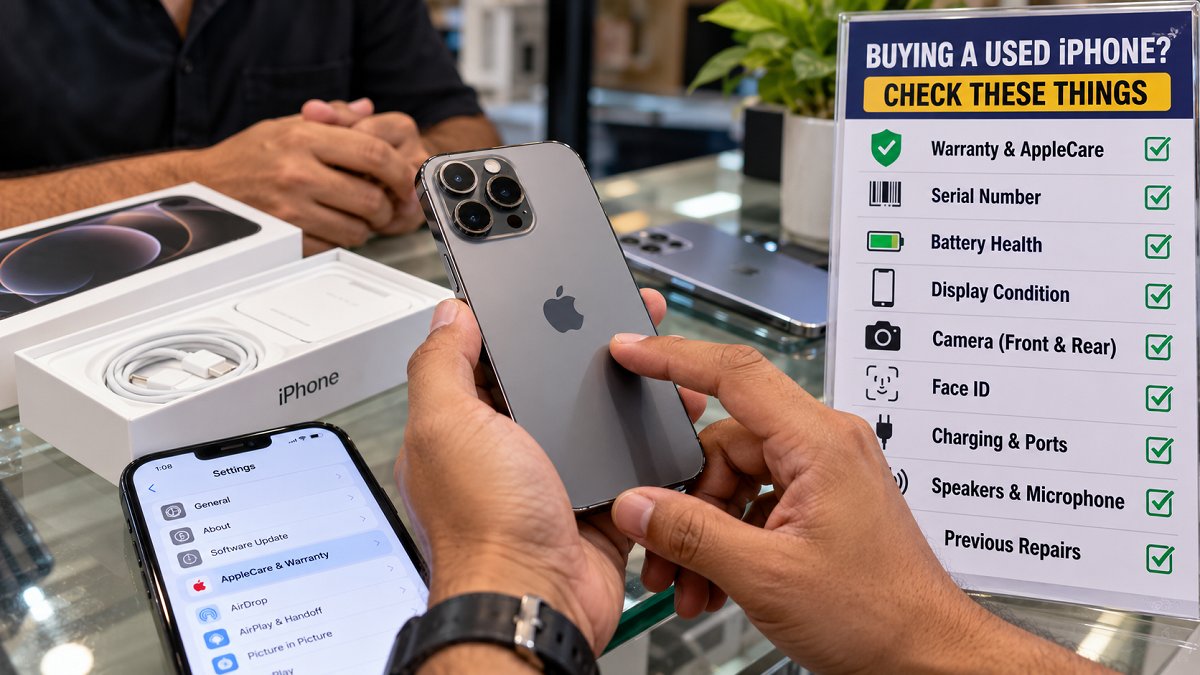
Before paying for a pre-owned iPhone, it is worth spending a few minutes checking its warranty or AppleCare coverage along with important hardware features such as the battery, display, cameras, Face ID, speakers and charging port.
Here are some of the most important checks to complete before buying a used iPhone.
1. Check AppleCare and Warranty Information From Settings
If you can physically inspect the iPhone before buying it, start by checking its available warranty information.
Open Settings on the iPhone and go to General. Look for the AppleCare & Warranty section. Depending on the device and software version, this section can display available information about Apple's limited warranty or an applicable AppleCare plan.
This is particularly useful when buying the phone directly from an individual seller because you can check the information yourself rather than relying solely on a screenshot or verbal assurance.
Make sure the details you see relate to the same iPhone being offered for sale.
2. Use the Serial Number to Check Coverage
What if you are purchasing the iPhone online and cannot physically inspect it immediately?
In that situation, ask the seller for the device's serial number and use Apple's official coverage-checking service to review available coverage information.
The serial number can generally be found by opening:
Settings > General > About
After obtaining the number, enter it on Apple's official coverage-checking page and follow the instructions displayed there.
This can help you verify available warranty or coverage information before proceeding further with the purchase.
However, a serial number alone should never be treated as proof that a seller actually possesses the device. Buyers should still independently verify the physical phone and its details before completing an expensive transaction.
3. Examine Battery Health
Battery condition is particularly important when buying an older iPhone because batteries naturally lose capacity with use and age.
Check the battery information available in the iPhone's Settings and look for warnings relating to battery condition or servicing.
A significantly degraded battery does not necessarily mean the phone is unusable, but it may mean that you need to budget for a battery replacement.
Factor that potential expense into the price being demanded by the seller.
4. Inspect the Display Carefully
A screen can look fine at first glance while still having defects.
Increase and decrease the brightness, open different coloured backgrounds and inspect the entire display. Look for dead pixels, unusual lines, discolouration, flickering or areas where touch input does not respond properly.
Try typing across the keyboard and moving icons around the screen to test touch responsiveness.
You should also inspect the screen and frame for signs of major impact damage.
5. Test Every Camera
Do not simply open the camera application and assume everything is working.
Take photos using the front and rear cameras and test all available lenses. Record a short video and check focusing, stabilisation and image quality.
Look for unusual blur, spots, shaking or difficulty focusing.
Testing cameras becomes particularly important on iPhones with multiple rear lenses because one camera can have a problem even when the others appear to work normally.
6. Make Sure Face ID Works Properly
If the iPhone model supports Face ID, test it before completing the purchase.
Face ID is an important security and authentication feature used for unlocking the phone and approving various actions.
Set it up or test the existing functionality as appropriate and make sure facial recognition works reliably. Problems involving Face ID hardware can be more complicated than an ordinary software issue, so a malfunction should not be ignored.
7. Check the Charging Port and Charging Function
Connect a compatible charging cable and verify that the iPhone begins charging normally.
Inspect the port for visible damage, excessive looseness or other abnormalities. If the model supports additional charging methods that matter to you, test those as well when possible.
A phone that charges intermittently may require cleaning, servicing or hardware repair.
8. Test Speakers, Microphones and Calls
Make a test call before purchasing the device.
Check whether you can hear the other person clearly through the earpiece and whether your voice is transmitted properly through the microphone. Play music or a video through the speakers and listen for crackling, distortion or unusually low output.
Recording a short voice memo can also help you evaluate microphone performance.
9. Find Out Whether Parts Have Been Replaced
A used iPhone may have undergone repairs during its lifetime, so buyers should try to understand its repair history.
Ask the seller whether the screen, battery, camera or any other major component has previously been replaced.
On supported iPhone models and iOS versions, Apple may also provide Parts and Service History information under Settings > General > About. Review this section when available.
A repaired iPhone is not automatically a bad purchase, but the quality and origin of replacement components matter. Poor-quality or improperly installed third-party components can affect reliability and functionality.
An Expired Warranty Does Not Automatically Make It a Bad Deal
Finding that Apple's warranty has expired does not necessarily mean you should reject the phone. Many perfectly functional older iPhones are naturally outside their original warranty period.
What changes is the level of caution required.
If there is no warranty or AppleCare coverage, thoroughly inspect the battery, display, cameras, Face ID, buttons, charging system, speakers and microphones. Any future repair costs will generally become an important consideration for the buyer.
Also make sure the seller has removed their personal account and that the device can be properly transferred to you before finalising the transaction.
Don't Let a Low Price Override Basic Checks
A heavily discounted used iPhone can look tempting, but an apparently cheap device may become expensive if it soon requires a new battery, screen or other major repair.
Take enough time to inspect the phone, compare its condition with the asking price and verify the information provided by the seller.
For online purchases, be particularly cautious about making full payment before you have adequate confidence in the seller and device.
A few careful checks before buying a second-hand iPhone can help you distinguish a genuinely good deal from a phone that could bring unexpected repair bills later.