WhatsApp has become one of the most widely used messaging platforms in the world, helping billions of people stay connected with family, friends, colleagues, and businesses. From personal conversations and confidential work discussions to sharing documents and photos, users often store sensitive information inside the app. As concerns around digital privacy continue to grow, WhatsApp offers several security tools designed to keep conversations protected.
One of the platform's most useful privacy features is Chat Lock, which allows users to secure specific conversations with an additional layer of protection. Instead of locking the entire application, this feature enables users to protect individual chats using their device's authentication methods, such as a fingerprint, Face ID, or passcode.
If you regularly use WhatsApp and want greater control over who can access your private conversations, here's a complete guide on how to lock a WhatsApp chat and why this feature can be beneficial.
What Is WhatsApp Chat Lock?
Chat Lock is a privacy-focused feature that helps users secure selected conversations from unauthorized access. Once a chat is locked, it is moved to a separate protected folder that can only be opened through biometric verification or the device's security credentials.
This means that even if someone gains temporary access to your smartphone, they won't be able to view locked conversations without passing the authentication check.
The feature is especially useful for users who share their phones with family members, friends, or colleagues and want to keep certain chats private.
Why More Users Are Using Chat Lock
Digital privacy has become increasingly important as messaging apps now contain personal details, financial information, work-related discussions, and confidential documents.
By using Chat Lock, users can:
- Add an extra layer of privacy to sensitive conversations
- Prevent unauthorized access to specific chats
- Protect personal and professional information
- Keep selected messages hidden from casual viewers
- Increase overall account security without locking the entire app
The feature offers a convenient balance between accessibility and privacy.
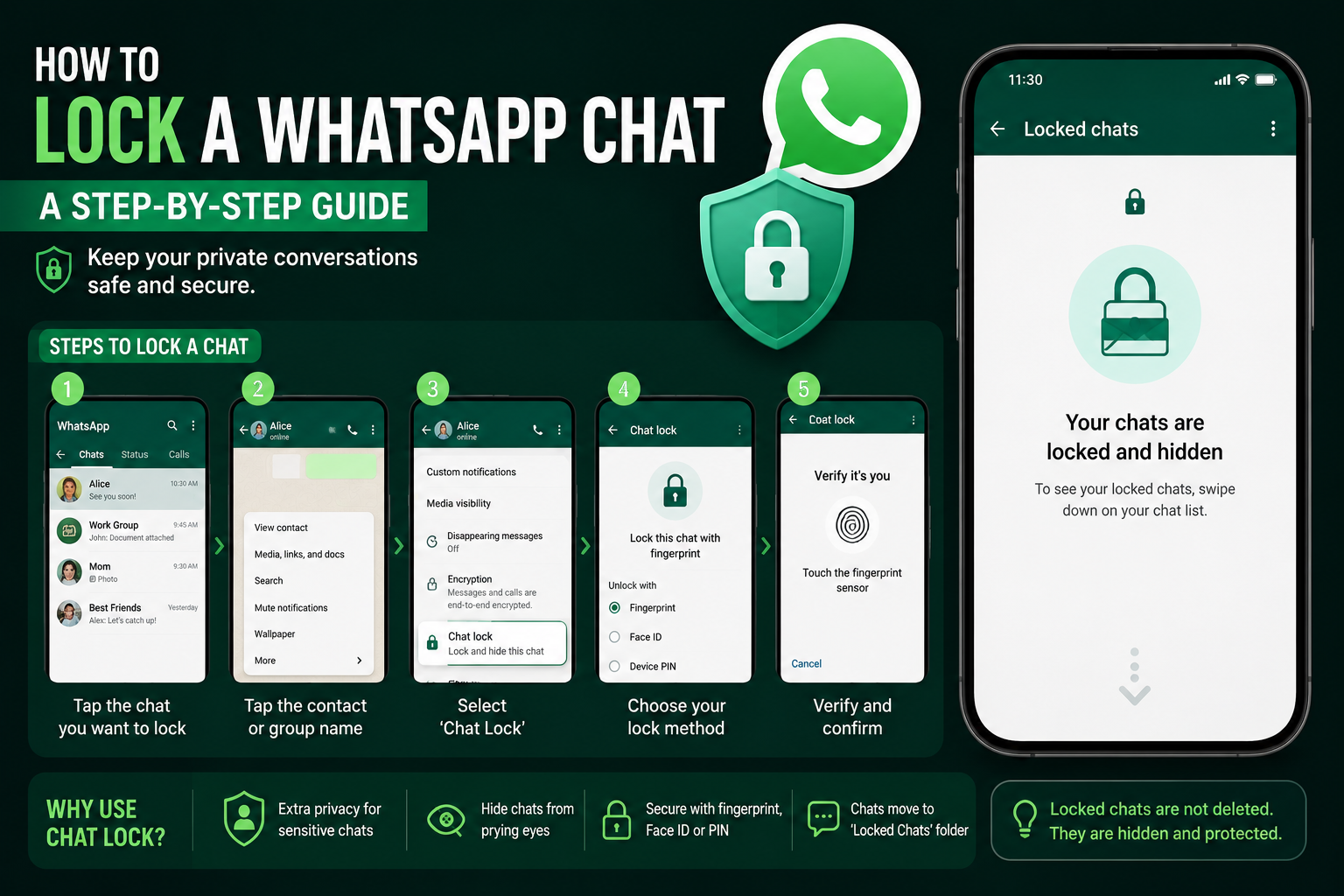
Step-by-Step Guide to Lock a WhatsApp Chat
Activating Chat Lock requires only a few taps and can be completed in less than a minute.
Step 1: Open WhatsApp
Launch the WhatsApp application on your smartphone and navigate to the conversation you wish to secure.
Step 2: Access Chat Information
Tap the contact name or group name displayed at the top of the chat screen. This will open the chat information page where additional settings are available.
Step 3: Find the Chat Lock Option
Scroll through the available settings until you locate the Chat Lock feature.
Step 4: Enable Chat Lock
Tap on Chat Lock and choose the available security method. Depending on your device, options may include:
- Fingerprint authentication
- Face ID
- Device passcode
- Screen lock credentials
Step 5: Confirm Verification
Complete the authentication process to activate the lock.
Once verified, the selected conversation will automatically move to the Locked Chats folder.
How to Access Locked Conversations
After enabling Chat Lock, the protected conversation will no longer appear alongside regular chats in the standard chat list.
To view locked chats:
- Open WhatsApp.
- Go to the Chats tab.
- Swipe down on the chat list.
- Select the Locked Chats folder.
- Verify your identity using fingerprint, Face ID, or device passcode.
After successful verification, the secured conversations will become accessible.
How to Remove Chat Lock
If you decide that a conversation no longer requires additional protection, you can disable the feature at any time.
Follow these steps:
- Open the locked conversation.
- Tap the contact or group name.
- Select Chat Lock.
- Turn the feature off.
- Confirm your identity using the required authentication method.
The conversation will then return to your normal chat list.
Additional Privacy Features Available on WhatsApp
Beyond Chat Lock, WhatsApp offers several security tools that help users protect their accounts and conversations:
End-to-End Encryption
Messages, calls, photos, and videos are protected so that only the sender and recipient can access them.
Two-Step Verification
Adds a PIN-based security layer to prevent unauthorized account access.
Privacy Controls
Users can manage who sees their profile photo, last seen status, online status, and personal information.
Encrypted Backups
Cloud backups can be secured with end-to-end encryption for enhanced protection.
A Simple Way to Strengthen Your Privacy
As smartphones increasingly store sensitive personal and professional information, protecting conversations has become more important than ever. WhatsApp's Chat Lock feature provides a straightforward and effective way to secure individual chats without affecting the rest of your messaging experience.
Whether you're safeguarding confidential work discussions, personal conversations, or important documents, enabling Chat Lock can significantly improve your privacy. With just a few simple steps, users can add an extra layer of protection and gain greater control over who can access their most important WhatsApp conversations.