Google is making document scanning significantly more intelligent with a major upgrade to the scanner built into Google Drive. The latest update introduces several AI-powered capabilities designed to help users scan documents faster, reduce manual corrections, and improve overall scan quality.
Whether you're digitizing receipts, invoices, handwritten notes, contracts, or office paperwork, the new features aim to make the scanning experience more accurate and less time-consuming.
The upgrade also brings a refreshed design and introduces powerful on-device artificial intelligence that works even without an internet connection.
Google Revamps Its Built-In Document Scanner
As part of the update, Google has redesigned the scanning interface inside Google Drive.
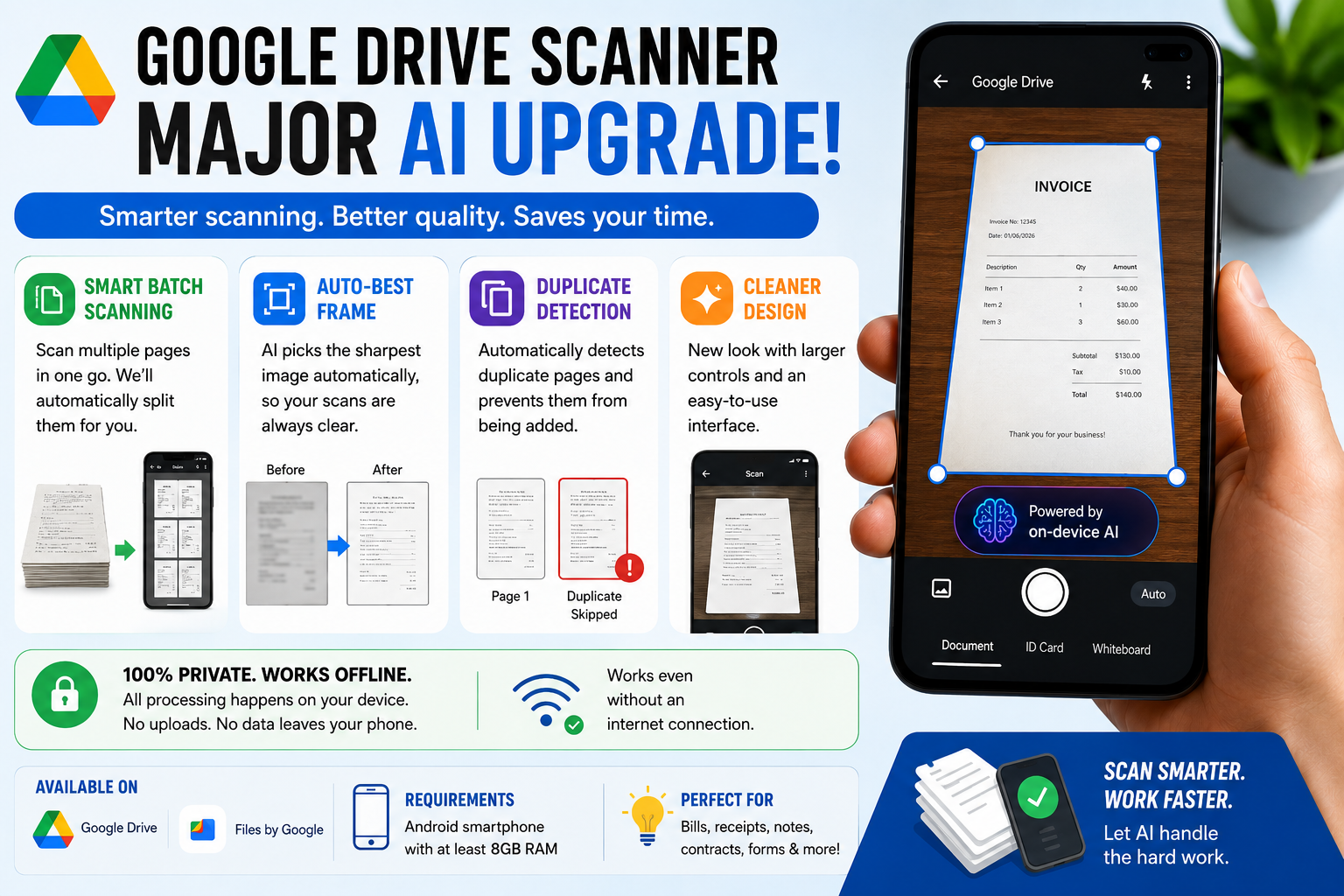
The new look follows Google's latest Material 3 Expressive design language, offering a cleaner layout, larger controls, and a more user-friendly experience. Navigation has also been simplified, making document scanning easier for both casual and professional users.
One noticeable change is the removal of the experimental beaker icon that previously appeared in certain versions of the app.
However, the biggest improvements are happening behind the scenes through AI-powered automation.
Smart Batch Scanning Makes Multi-Page Documents Easier
One of the standout additions is a feature called Smart Batch Scanning.
Previously, users scanning lengthy documents had to capture each page individually. This often required repeatedly pressing the shutter button and manually organizing pages afterward.
The new system simplifies this process considerably.
With Smart Batch Scanning, users can scan multiple sheets in a single session, and the application automatically separates them into individual pages within the final document.
This means:
- Faster scanning of large document sets
- Less manual intervention
- Improved productivity
- Easier creation of multi-page PDFs
For students, office workers, accountants, and professionals who regularly handle paperwork, the feature could save significant time.
AI Automatically Chooses the Clearest Scan
Another major enhancement comes through Google's new Auto-Best Frame technology.
Blurry scans are one of the most common frustrations when digitizing documents. A slight hand movement or focus issue can ruin an otherwise important scan.
Google's AI now helps solve this problem automatically.
The system evaluates captured frames and intelligently selects the sharpest version available. If one image suffers from motion blur or focus problems, the scanner can replace it with a clearer alternative.
Benefits include:
- Better document readability
- Fewer rescans
- Cleaner PDF files
- Reduced editing effort
This feature is particularly useful when scanning documents quickly or under less-than-ideal lighting conditions.
Duplicate Page Detection Reduces Errors
Another practical addition is automatic duplicate detection.
When scanning large stacks of paperwork, it's common to accidentally capture the same page multiple times. This can create unnecessarily large files and cause confusion later.
The upgraded scanner can now identify duplicate pages and prevent them from being added to the final document.
This helps users:
- Avoid repeated pages
- Keep files organized
- Reduce storage usage
- Improve document accuracy
The feature is especially beneficial for business users, students, and professionals handling lengthy reports or records.
AI Processing Works Directly on the Device
One of the most notable aspects of the update is Google's decision to perform AI processing locally on the device.
Instead of uploading scanned images to remote servers for analysis, all enhancements happen directly on the smartphone.
This approach offers several advantages:
Improved Privacy
Documents remain on the device during processing.
Faster Results
No internet upload delays are involved.
Offline Functionality
Scanning tools continue working even without a network connection.
Better Security
Sensitive documents are not required to leave the user's device for AI processing.
For users concerned about data privacy, this is a significant improvement.
Which Devices Can Use the New Features?
The upgraded scanner is currently being rolled out to selected Android devices.
According to Google, the new AI-powered scanning tools require smartphones equipped with:
- Android operating system
- Minimum 8GB RAM
- Latest versions of Google Drive or Files by Google
Users meeting these requirements should begin receiving the features as the rollout expands.
Where Can You Access the New Scanner?
The enhanced scanning experience is available through:
- Google Drive
- Files by Google
Google plans to gradually expand availability as deployment continues across supported devices.
Why This Upgrade Matters
Document scanning has become an essential feature for students, professionals, business owners, and remote workers. From submitting forms and managing receipts to storing contracts digitally, scanning is now part of everyday productivity.
By combining AI-powered image enhancement, automatic page organization, duplicate detection, and offline processing, Google is transforming its scanner from a basic utility into a much smarter document management tool.
Final Thoughts
Google's latest scanner upgrade brings meaningful improvements that address some of the biggest pain points users face when digitizing documents. Features like Smart Batch Scanning, Auto-Best Frame, and duplicate-page detection make the process faster, more accurate, and far more convenient.
With AI running directly on supported Android devices, users can enjoy enhanced privacy, better scan quality, and offline functionality—all without needing additional apps. As the rollout continues, Google Drive is set to become an even more powerful tool for managing documents on the go.