In today’s digital-first world, apps have become a part of everyday life—from banking and shopping to gaming and social media. But with this convenience comes a growing risk. Cybercriminals are increasingly creating fake apps that look almost identical to genuine ones, tricking users into downloading them and stealing sensitive data.
If you install apps without proper checks, you could unknowingly expose your personal information, passwords, and even banking details. Here’s a complete guide to identifying fake apps and staying safe.
Why Fake Apps Are Dangerous
Fake apps are designed to mimic popular applications. Once installed, they may:
- Steal personal data like contacts, photos, and messages
- Access banking credentials and OTPs
- Slow down your phone or show excessive ads
- Install malware that can hack your device
These apps often look so real that it becomes difficult to differentiate them at first glance.
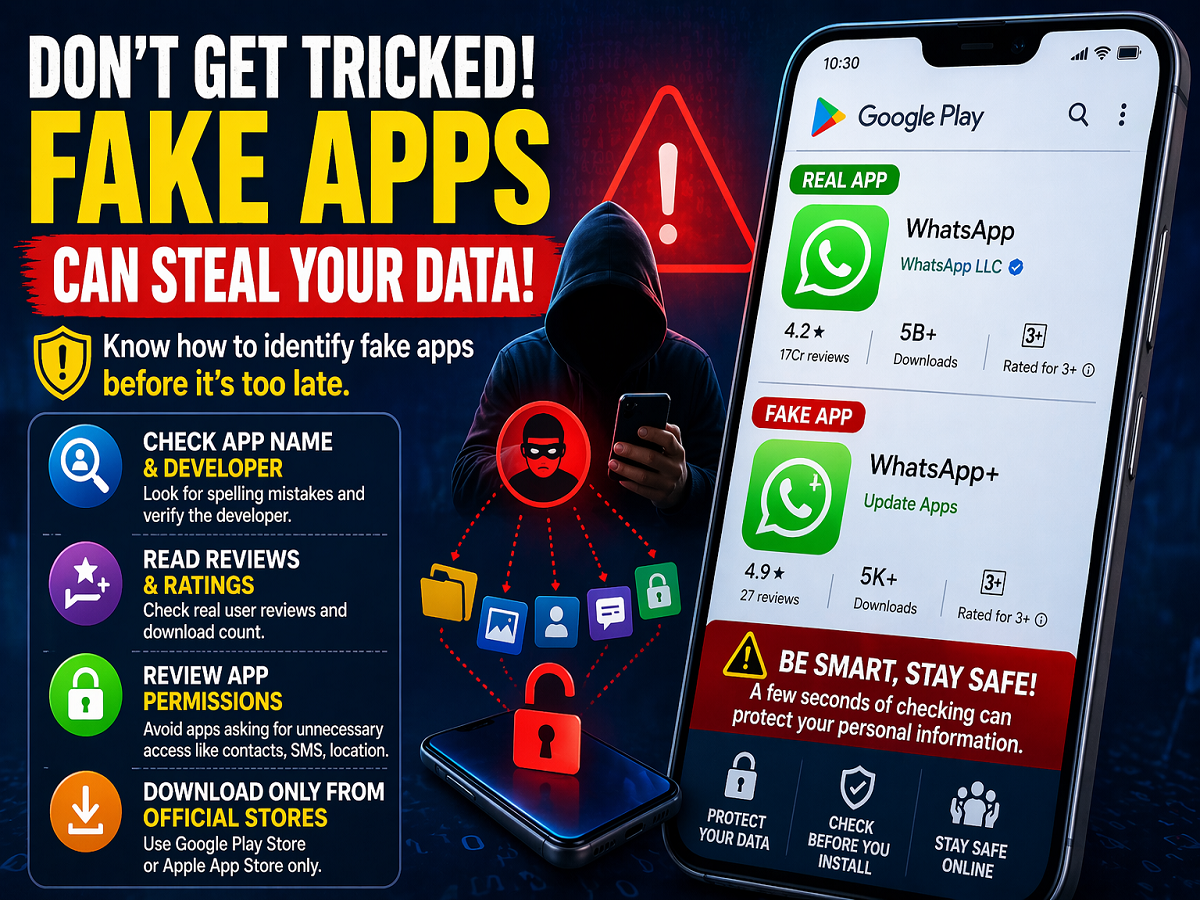
1. Check the App Name and Developer Carefully
One of the easiest ways to spot a fake app is by closely examining its name and developer details.
Cybercriminals often use slightly altered names such as:
- “WhatsApp+” instead of WhatsApp
- “Update WhatsApp” or similar variations
Always verify the developer name. Genuine apps are usually published by well-known companies like Meta Platforms or other verified organizations. If the developer name looks suspicious or contains spelling errors, avoid downloading the app.
2. Review Ratings, Reviews, and Downloads
Before installing any app, take a few seconds to check:
- Number of downloads
- User ratings
- Real user reviews
Be cautious if:
- The app has very few downloads but extremely high ratings
- Reviews look generic or overly positive
- Users complain about crashes, ads, or suspicious activity
Authentic apps usually have millions of downloads and detailed user feedback.
3. Be Careful with App Permissions
Permissions are a major red flag when it comes to fake apps.
For example:
- A flashlight or calculator app asking for access to contacts, camera, or location is suspicious
Always review what permissions an app is requesting. If it asks for access unrelated to its function, it’s better to avoid installing it.
4. Download Only from Official Platforms
Always install apps from trusted sources like:
- Google Play Store
- Apple App Store
Avoid downloading APK files from unknown websites, WhatsApp links, or third-party platforms. These are common sources of malware-infected apps.
5. Watch for Warning Signs After Installation
Even after installing an app, stay alert for unusual behavior such as:
- Rapid battery drain
- Sudden increase in mobile data usage
- Frequent pop-up ads
- Phone becoming slow or overheating
These could indicate that the app is malicious.
Final Takeaway
Installing apps without checking can lead to serious risks, including data theft and financial fraud. By verifying app details, reading reviews, checking permissions, and sticking to official app stores, you can significantly reduce the chances of falling victim to fake apps.
In a time when cybercrime is rising rapidly, a few extra seconds of caution can protect your entire digital identity.